In this tutorial, you will learn how to:
• Enable or disable Bluetooth
• Pair with device
• Unpair a device
Enable or Disable Bluetooth
1. Press the Watch Crown to access the Apps tray, then scroll to and select the  Settings app.
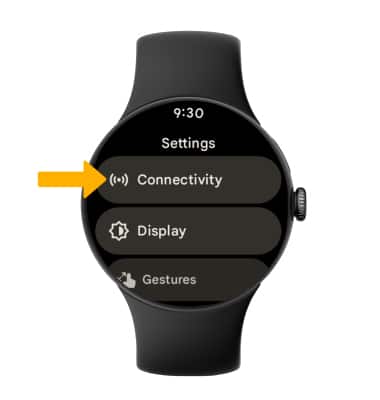
2. Select Connectivity.
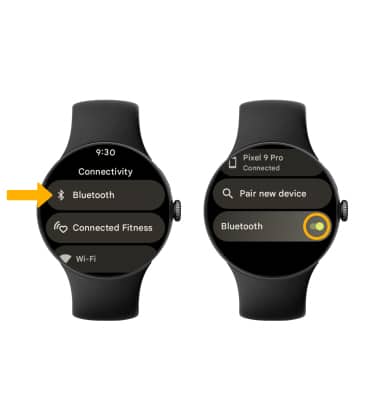
3. Select Bluetooth, then select the Bluetooth switch.
Pair with device
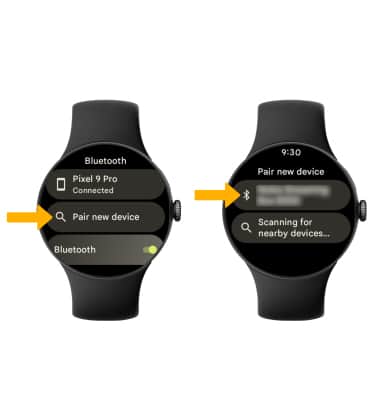
To pair with a device, scoll to and select Pair new device. Select the desired device to pair.
Unpair a device
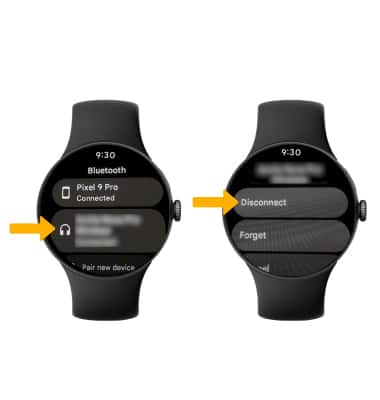
To unpair a device, select the paired device, and then select Disconnect.
Note: If having trouble pairing/unpairing your device with your vehicle, please refer to your vehicle's user manual for additional information.