
In this tutorial, you will learn how to:
• Set up eSIM
• Manage cellular plans
• Erase eSIM
If you are trying to find your EID for your associated eSIM, view the Find IMEI, Serial number, & EID tutorial.
Set up eSIM
1. From the home screen, select the  Settings app.
2. Select Cellular Data, then select Add a New Plan.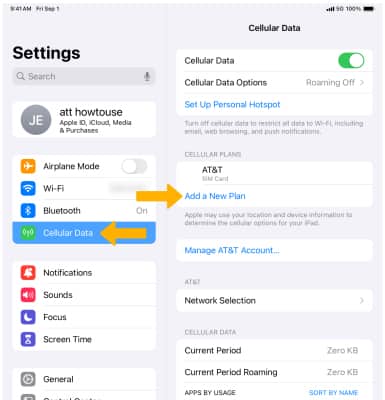
3. Select the desired SIM option, then follow the prompts to add an eSIM.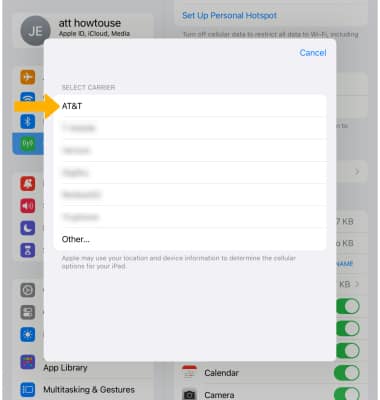
4. Select Set Up eSIM.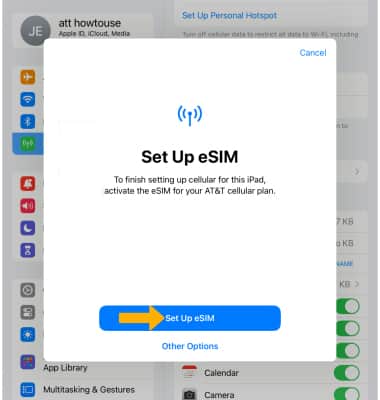
Manage cellular plans
To switch between cellular plans, from the Cellular Data screen, select the desired plan under CELLULAR PLANS then edit settings as desired.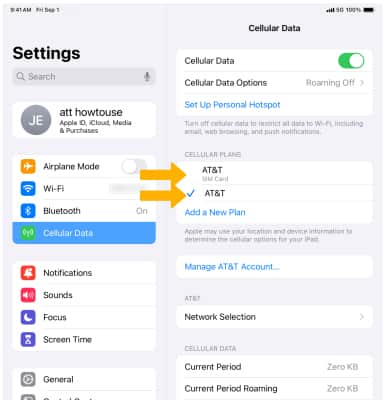
Erase eSIM
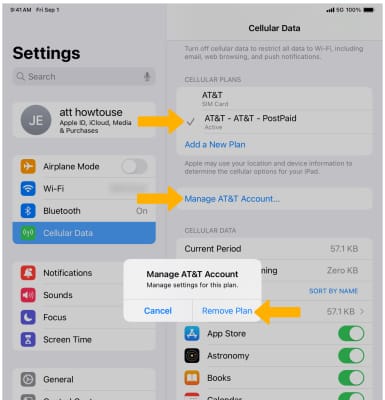
From the Cellular Data menu in Settings, select the desired SIM Plan. Select Manage AT&T Account, then select Remove Plan.
Note: You will be prompted to select Remove again to confirm. For more information, visit Using Dual SIM with an eSIM.