In this tutorial, you will learn how to:
• Quickly turn Bluetooth on or off
• Enable or Disable Bluetooth through settings
• Pair with device
• Unpair a device
When connected to a device via Bluetooth, the  Bluetooth pair icon will display in the notification bar.
Quickly turn Bluetooth on or off
Swipe down from the upper right corner of the screen to access Quick Settings, then select the  Bluetooth icon.
Enable or Disable Bluetooth
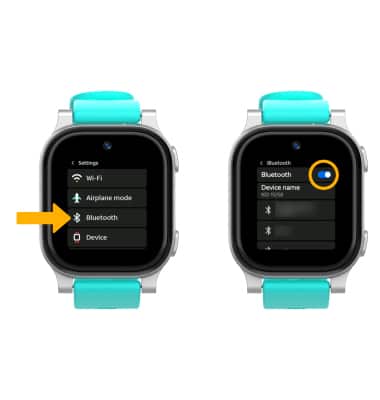
1. From the Clock screen, swipe left three times then select the  Settings app.
2. Scroll to and select Bluetooth then select the Bluetooth switch.
Note: To optimize battery life, turn Bluetooth off when not in use.
Pair with device
When Bluetooth is enabled, your device will automatically scan for devices. Select the desired device to pair, then select Connect.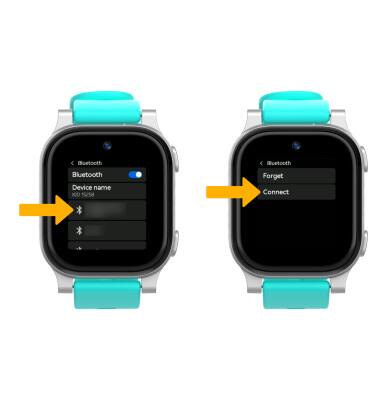
Unpair a device
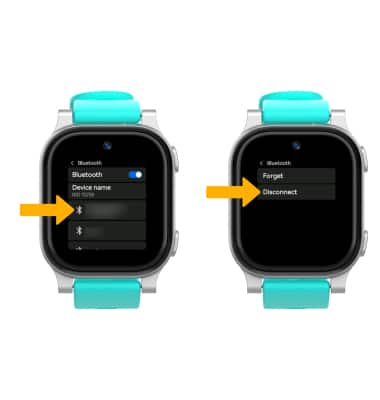
From the Bluetooth screen, scroll to and select the the desired paired device. Select Disconnect to unpair the device.
Note: If having trouble pairing/unpairing your device with your vehicle, please refer to your vehicle's user manual for additional information.