In this tutorial, you will learn how to:
• Access Call screening settings
• Screen unknown callers
Access Call screening settings
1. Call Screening helps users manage incoming phone calls from unknown numbers more efficiently by either collecting a name and reason for the call, or sending unknown callers directly to voicemail. To access Call screening settings, from your paired iPhone, navigate to and select the  Settings app.
2. Scroll to and select Apps, then scroll to and select Phone. 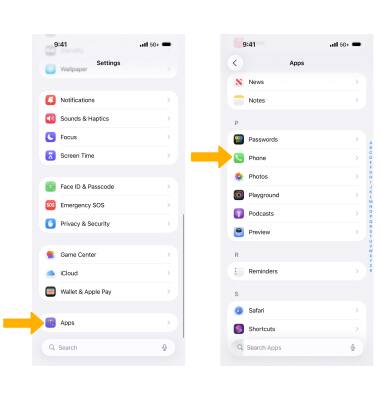
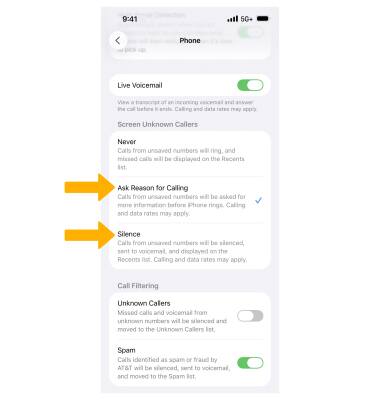
3. Select the desired option under Screen Unknown Callers.
Note: Ask Reason for Calling asks callers with unsaved numbers for more information before your iPhone rings. Silence keeps your iPhone silent and sends unknown calls automatically to voicemail.
Screen unknown callers
1. When receiving a call from an unknown caller, your paired iPhone will ask the caller who they are and why they are calling. A live transcript will be displayed on your Apple Watch.
Note: For this demonstration, Ask Reason for Calling is being used. To use Call screening, you will need to keep your paired iPhone nearby your Apple Watch.
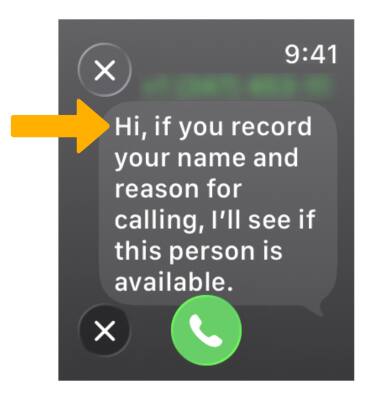
2. When the unknown callers responds, select the desired option:
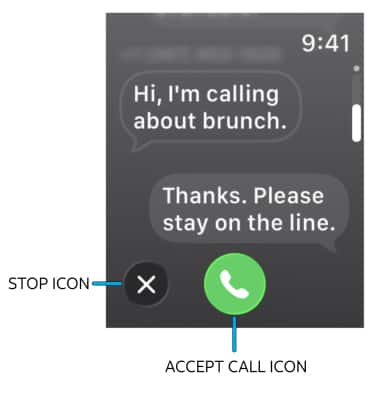
• DECLINE CALL: Select the Stop icon to decline the call.
• ACCEPT CALL: Select the Accept call icon.