In this tutorial, you will learn how to:
• Access the Emergency SOS screen
• Make a SOS call
• Make a 911 call
• Make SOS message
Access the Emergency SOS screen
Press and hold the SOS button until the Emergency SOS screen appears. 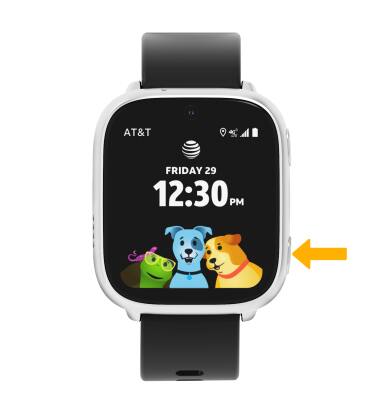
Make a SOS call
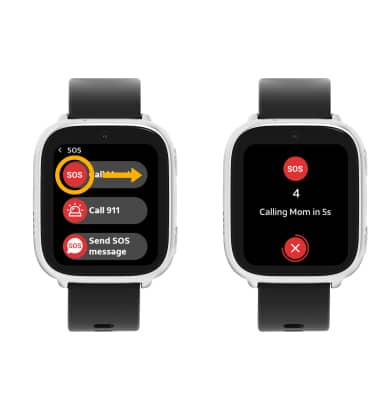
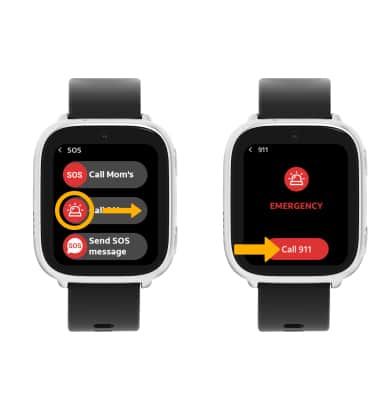
From the SOS screen, select and drag the SOS icon to the right to make a SOS call. After a 5 second countdown, your call is launched.
Note: SOS will only call the phone number of the primary guardian.
Make a 911 call
From the SOS screen, select and drag the Call 911 icon to the right to make a 911 call. Select Call 911 to confirm. After a 5 second countdown, your call is launched.
Note: You can also make a 911 call from the Phone app. To make an emergency call from the Phone app, swipe right from the Watch screen > Phone app > Contacts tab > 911.
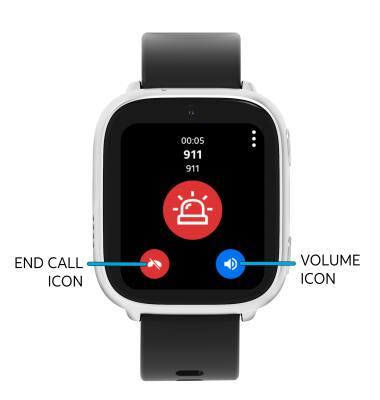
While on a 911 call, select the Volume icon to adjust the volume. Select the End call icon to end the call.
Make SOS message
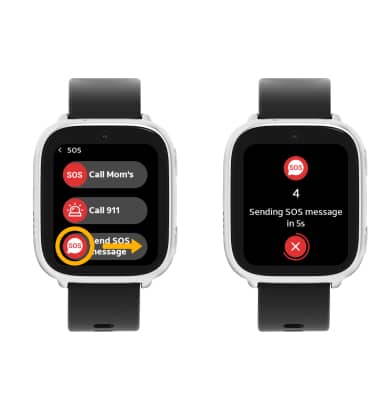
From the SOS screen, select and drag the Send SOS message icon to the right to send a SOS message. After a 5 second countdown, your message is sent.
Note: SOS message will only message the phone number of the primary guardian. When a SOS message is sent, the guardian will receive a message notification that the child needs assistance.