
 Play Store > search for and select the
 1. From your smartphone, navigate to and select the  AT&T amiGO™ app.
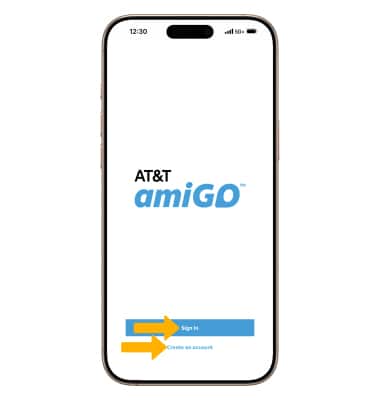
AT&T amiGO™ app.2. Select Sign in or Create an account and follow the prompts.
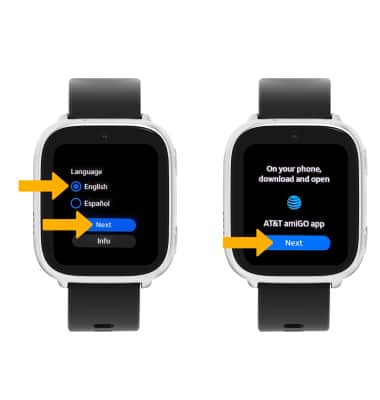
3. From your watch, select the desired language, then select Next. Select Next again.
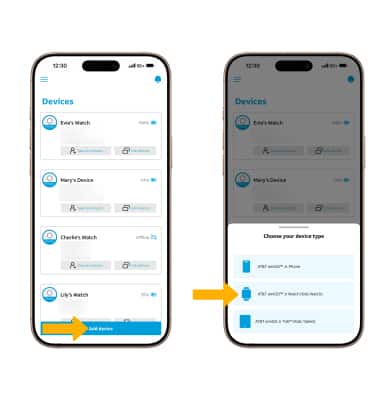
4. From the AT&T amiGO™ app on your smartphone, select Add a device, then select AT&T amiGO Jr Watch (Kids Watch).
Note: If you are connected to Wi-Fi, you will be prompted to disconnect to continue.
Note: If you are connected to Wi-Fi, you will be prompted to disconnect to continue.
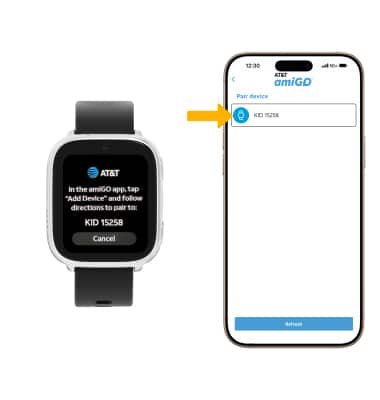
5. Your device will automatically scan for available devices. Select the desired device.
Note: Your watch and paired smartphone will establish a connection and link the watch to the amiGO™ account. This process will take approximately 1–2 minutes.
Note: Your watch and paired smartphone will establish a connection and link the watch to the amiGO™ account. This process will take approximately 1–2 minutes.
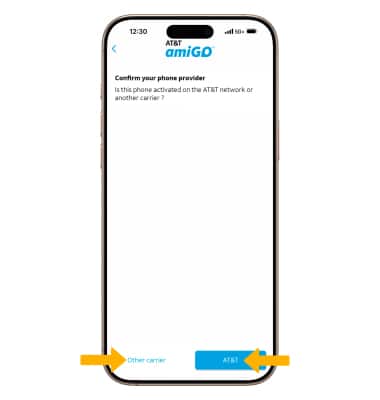
6. Select the desired carrier.
Note: The eSIM will download to your watch to enable cellular service. Do not disconnect or turn off your phone or watch.
Note: The eSIM will download to your watch to enable cellular service. Do not disconnect or turn off your phone or watch.
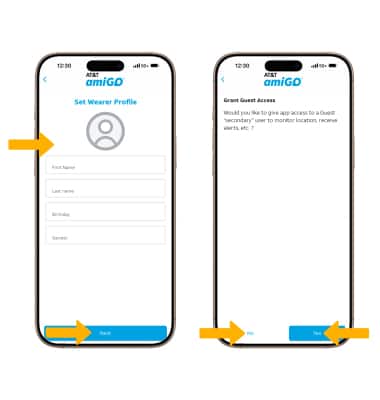
7. Enter the watch wearer’s details, then select Next. Review the Guest “secondary” user prompt, then select the desired option.
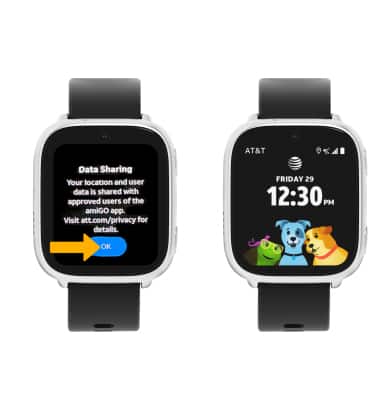
8. From the paired watch, select OK. Your watch activation is now complete.