In this tutorial, you will learn how to:
• Change the watch face
• Change time style
• Change time style
Change the watch face
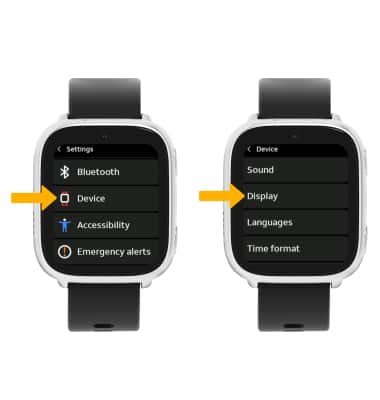
1. From the Clock screen, swipe left four times and select the  Settings app.
2. Scroll to and select Device, then select Display.
Settings app.2. Scroll to and select Device, then select Display.
Note: Alternatively, you can access the watch face settings by pressing and holding the watch face on the clock screen for a few seconds.
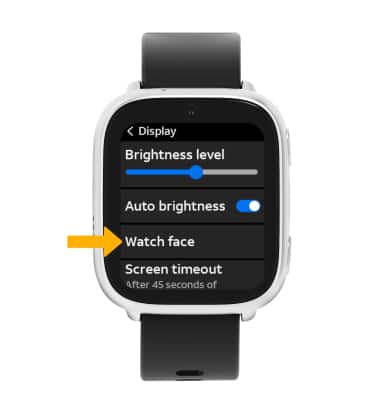
3. Select Watch face.
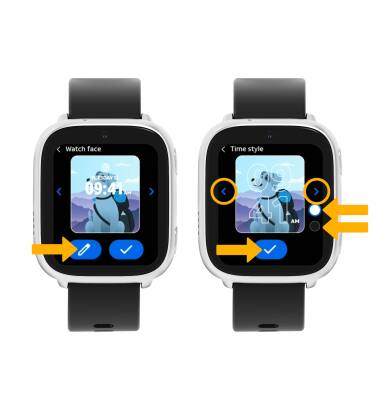
4. Select the left or right arrow to scroll to the desired watch face. When finished, select the Checkmark icon.
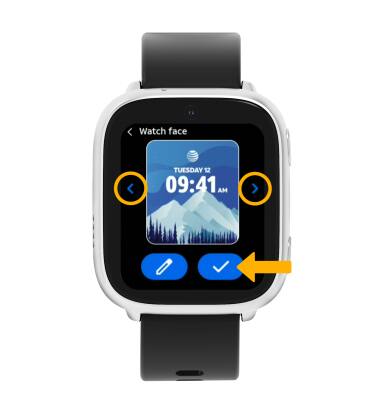
3. Select Watch face.
4. Select the left or right arrow to scroll to the desired watch face. When finished, select the Checkmark icon.
Change time style
From the Watch face settings screen, select the Edit icon. Select the left or right arrow to scroll to the desired time style, then select the desired color. When finished, select the Checkmark icon.