
In this tutorial, you will learn how to:
• Set up schedules
• Enable/disable Schedules
• Edit or delete Schedules limits
Set up schedules
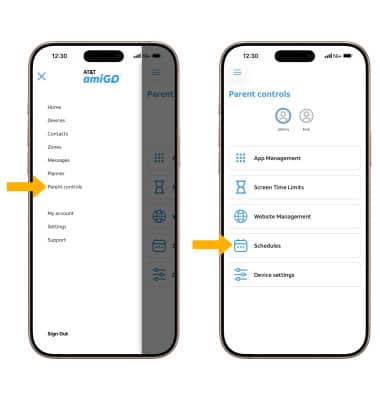
1. From the  AT&T amiGO app, select the
  Menu icon. Select Parental controls, then select Schedules.
2. Select Add Schedule. Edit the Schedule details as desired including Name, Start Time, End Time, and Repeat details. When finished, select Save.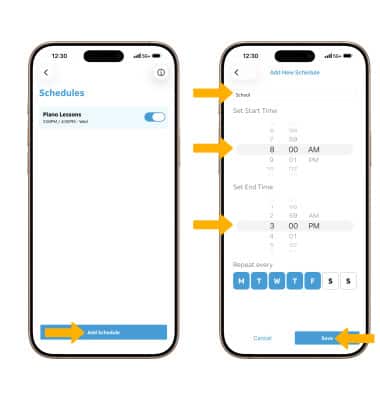
Enable/disable Schedules
To enable or disable a schedule, from the Schedules screen, select the switch next to the desired schedule.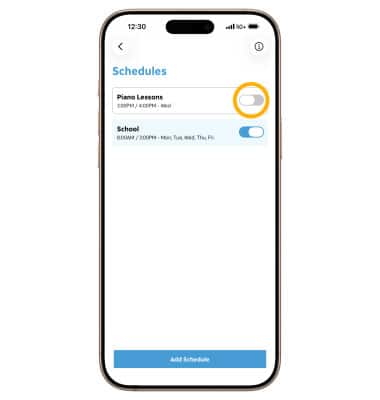
Edit or delete Schedules limits
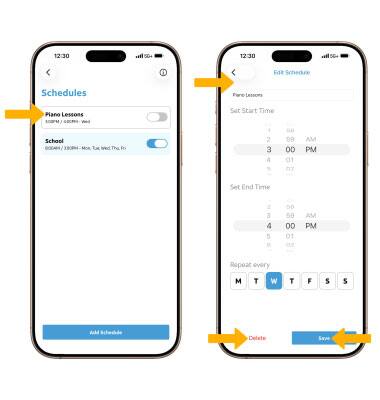
From the Schedules screen, select the desired schedule. To edit the schedule, edit the schedule details, then select Save. To delete a schedule, select Delete.
Note: If you delete a schedule, you will be prompted to select Yes, delete it to confirm.