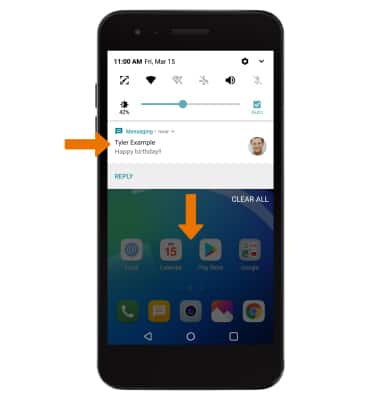
- ACCESS NOTIFICATIONS: Swipe down from the Notification bar. Notifications will be displayed.
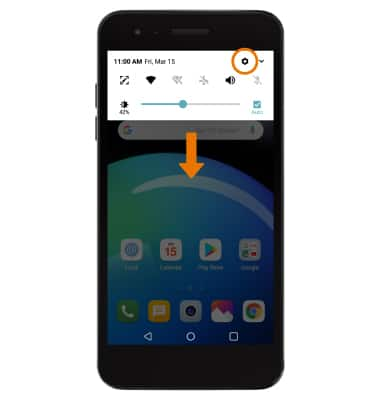
- TURN ON/OFF NOTIFICATIONS: Swipe down from the Notification bar, then select the Settings icon.
- Select the General tab > Apps & notifications > Notifications > Lock screen > desired option.
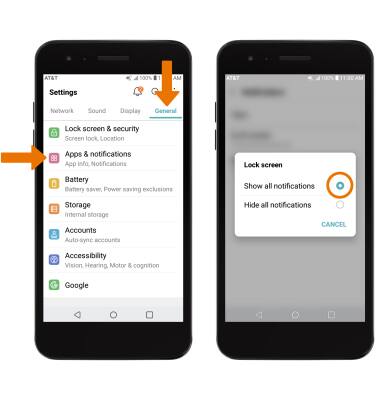
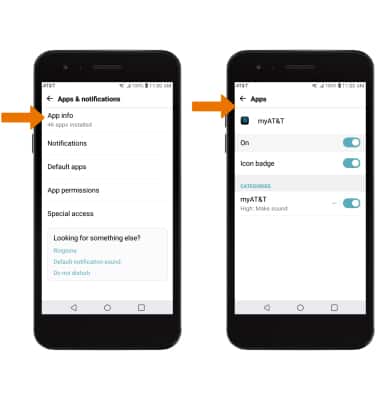
- ACCESS NOTIFICATIONS SETTINGS BY APP: From the Apps & notifications screen, select App info > desired app > App notifications > edit the desired Notification settings as desired.
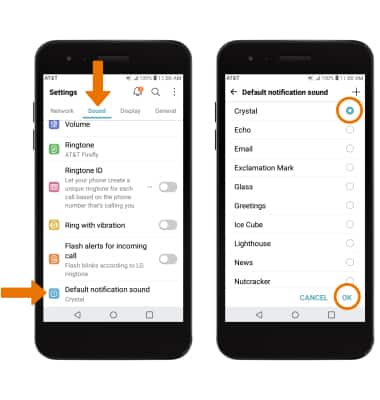
- ADJUST NOTIFICATION SOUNDS: From the Settings screen, select the Sound tab > scroll to and select Default notification sound > desired sound > OK.
Notifications & Alerts
LG Phoenix 4 (LM-X210)
Notifications & Alerts
How to access and adjust notification settings, turn notifications on or off, adjust app notifications, adjust notification sounds, and turn badges on or off.
INSTRUCTIONS & INFO