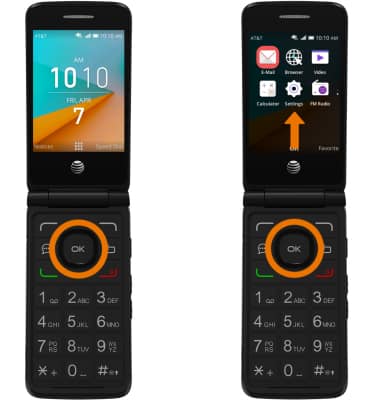
- TURN ON/OFF CALL BLOCKING: From the home screen, press the OK button. Press the directional buttons to navigate to and highlight the Settings app, then press the OK button.
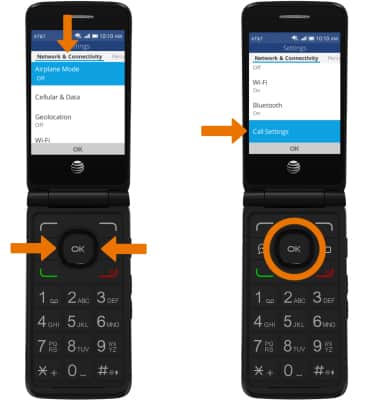
- Press the left and right directional buttons to navigate to the Network & Connectivity tab, then navigate to and select Call Settings.
- Navigate to and select Call Barring, then navigate to and select All.
Note: You have the option to enable or disable call barring for both incoming and outgoing calls.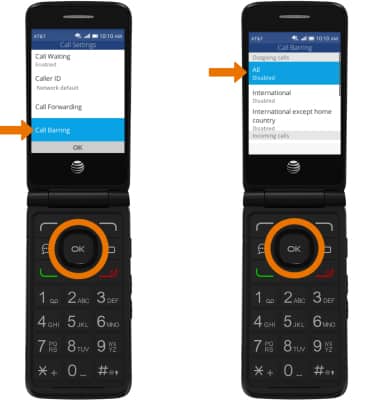
- Select Enable or Disable as desired.
Note: You will be prompted to enter a passcode if you select enable. The call blocking feature may not affect phone calls made or received via third-party apps installed on your device. Please contact third party app developers for assistance with such applications.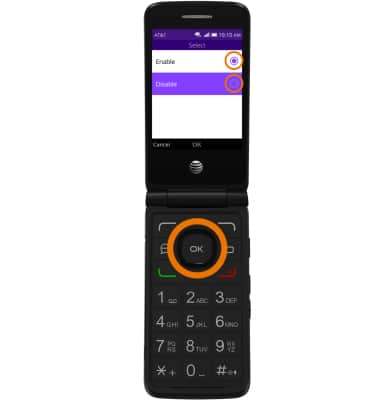
Block Calls
AT&T Cingular Flip 2 (4044O)
Block Calls
Block or unblock calls from your device.
INSTRUCTIONS & INFO