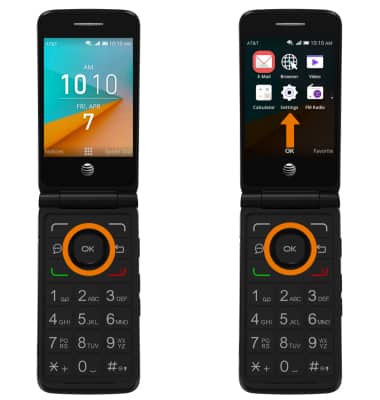
- VIEW PHONE NUMBER: From the home screen, press the OK button. Press the directional buttons to navigate to and highlight the Settings app, then press the OK button.
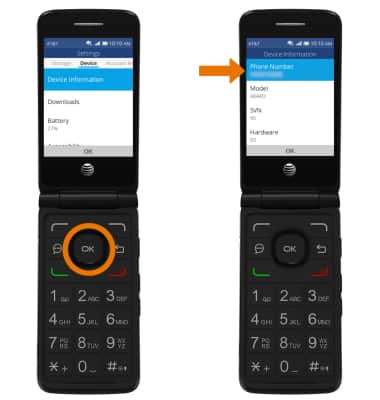
- Press the left or right directional buttons to navigate to the Device tab, then navigate to and select Device Information. Your phone number will be displayed.
- VIEW IMEI: From the Device Information screen, navigate to and select More Information then navigate to IMEI. Your IMEI will be displayed.
Note: You can also view your IMEI by entering *#06# from the keypad.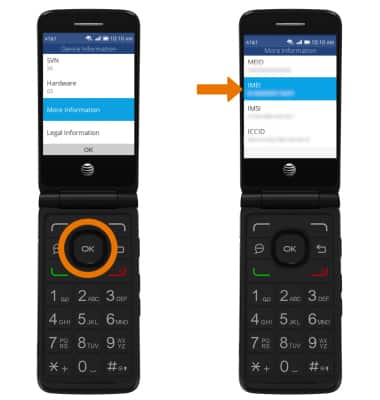
- VIEW IMEI ON DEVICE: You can also view your IMEI on the physical device by removing the back cover and battery.
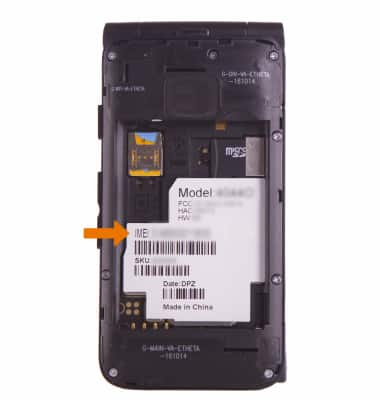
Find IMEI, Serial Number & Phone Number
AT&T Cingular Flip 2 (4044O)
Find IMEI, Serial Number & Phone Number
View the device IMEI, phone and serial numbers.
INSTRUCTIONS & INFO