- BLOCK A NUMBER: From the home screen, select the Phone app.
Note: Numbers blocked through the Phone app will also be blocked for the Messages app.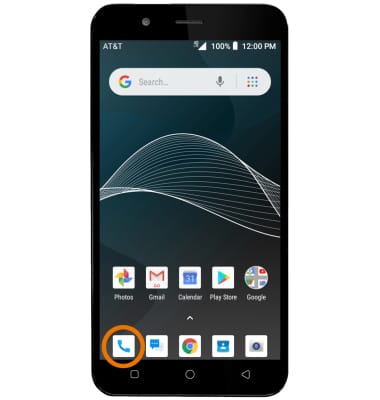
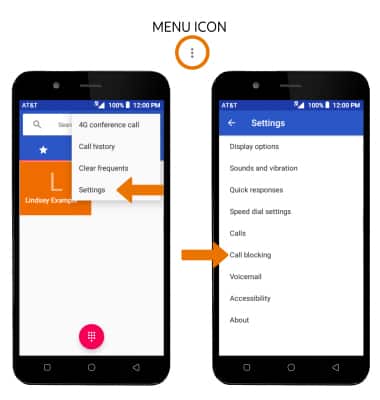
- Select the Menu icon, then select Settings. Select Call blocking.
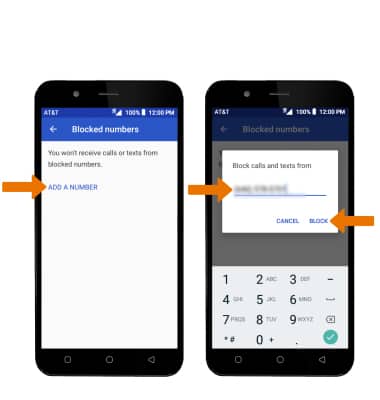
- From the Blocked numbers screen, select ADD A NUMBER > enter the desired number > select BLOCK.
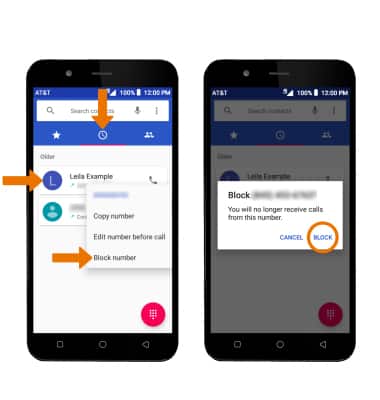
- BLOCK A NUMBER THROUGH THE CALL LOG: From the Phone app, select the Recents tab > select and hold the desired call > select Block number > BLOCK.
- UNBLOCK A NUMBER: From the Blocked numbers screen, select the Remove icon next to the desired number then select UNBLOCK.
Block Messages
AT&T AXIA (QS5509A)
Block Messages
Block messages from your device.