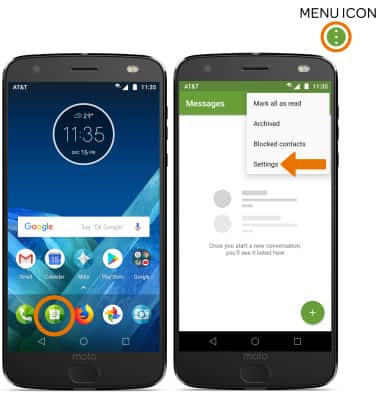
- ACCESS MESSAGING SETTINGS: From the home screen, select the Moto Messages app. Select the Menu icon, then select Settings.
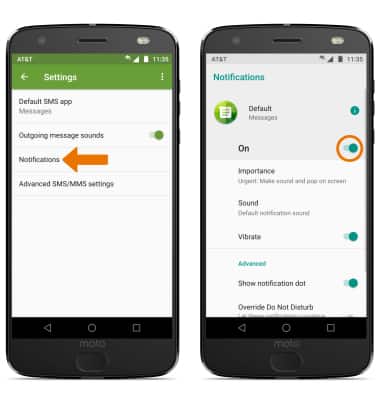
- ADJUST NOTIFICATIONS: Select Notifications, then select the Notifications switch to turn notifications on or off.
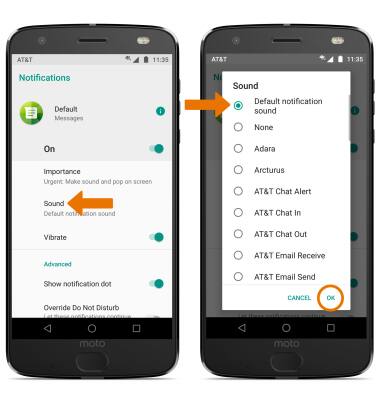
- Select Sound, then select the desired sound > OK.
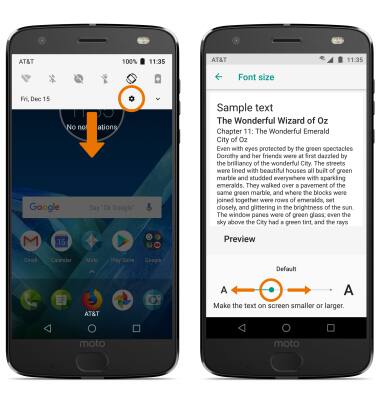
- CHANGE FONT SIZE: From the home screen, swipe down from the Notification bar > select the Settings icon > Display > Advanced > Font size > edit font size as desired.
- EMERGENCY ALERTS: From the Moto Messages app, select the Menu icon > Settings > Advanced SMS/ MMS settings > Wireless emergency alerts > Menu icon > Settings > edit Emergency alert settings as desired.
Note: Learn more about Wireless Emergency Alerts (WEA).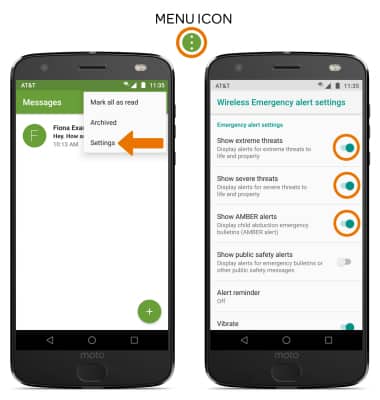
Messaging Settings
Motorola Moto Z2 Force Edition (XT1789)
Messaging Settings
Change text (SMS), picture (MMS), emergency, and AMBER alert settings.
INSTRUCTIONS & INFO