- ACCESS CAMERA SETTINGS: From the home screen, select the Camera app then select the Settings icon.
Note: See the Take a Picture or Video tutorial to learn how to use the device's camera.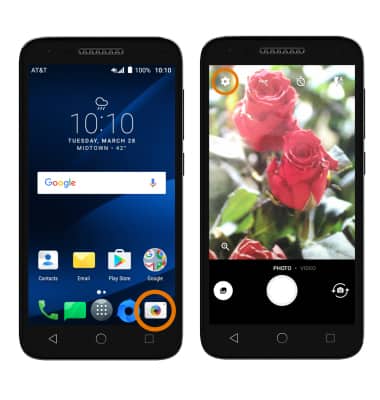
- CHANGE PICTURE SIZE: From the settings screen, select Size. Select the desired option.
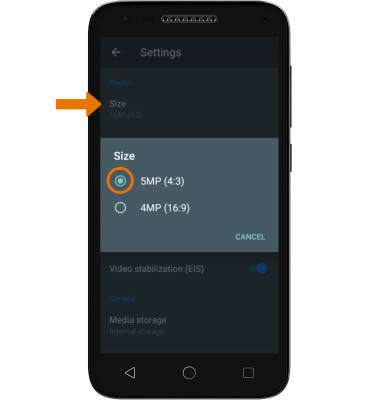
- TURN ON/OFF FLASH: Select the flash icon from the camera screen.
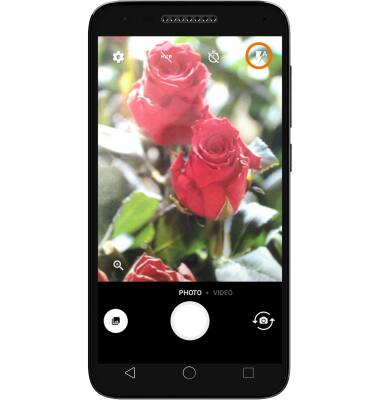
- SET A TIMER: Select the Timer icon repeatedly until the desired time is displayed.
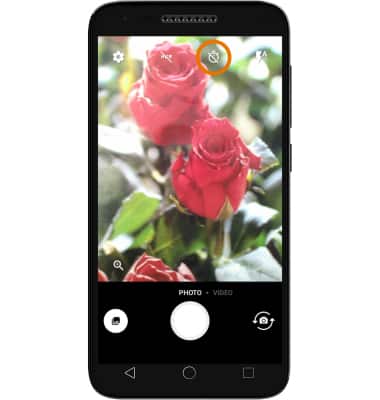
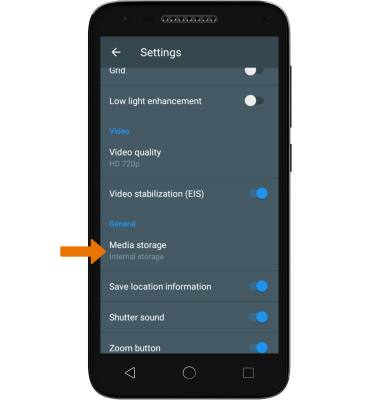
- SET STORAGE LOCATION: If you have a MicroSD card inserted, you can choose where you store your photos. Select the Settings icon > Media storage then select the desired option.
Camera & Video Settings
Alcatel IdealXCITE / CAMEOX (5044R)
Camera & Video Settings
Manage camera and video settings including flash, timer, storage location, and more.
INSTRUCTIONS & INFO