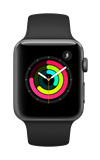
In this tutorial, you will learn how to:
• Schedule a time to use Do Not Disturb
• Enable or disable Do Not Disturb
• Quickly turn Do Not Disturb on/off
When Do Not Disturb is enabled, the
 Do Not Disturb icon will be displayed on the clock screen and at the top of the watch.
 Schedule a time to use Do Not Disturb
1. From the clock screen, press the Digital Crown/Home button then select the  Settings app.
2. Scroll to and select Focus, then select Do Not Disturb.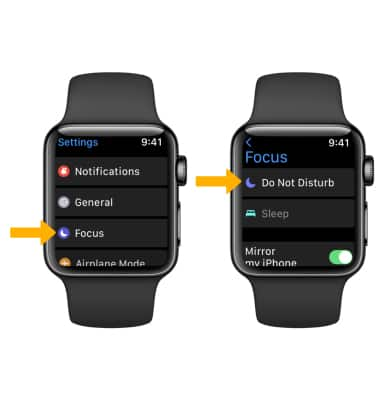
3. To schedule a time to use Do Not Disturb, Select Add new....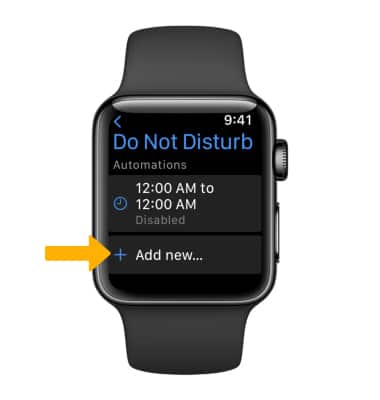
4. Select From or To. Rotate the Digital Crown/Home button to select the desired time, then select the Checkmark icon to save.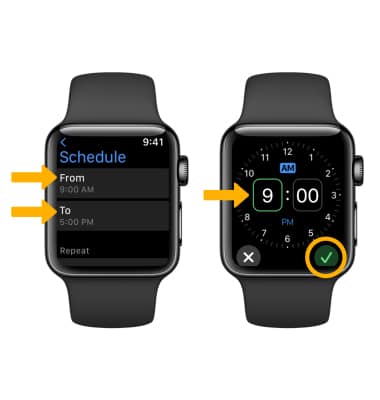
Enable or disable Do Not Disturb
Select the desired scheduled Do Not Disturb time, then scroll to and select the Do Not Disturb switch to turn on or off.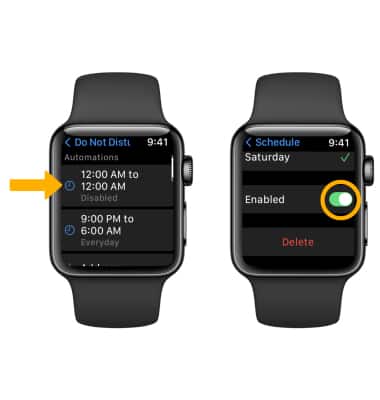
Quickly turn Do Not Disturb on/off
From the clock screen, swipe up from the bottom of the screen then scroll to and select the Do Not Disturb icon.