- From the home screen, press the Center nav key.

- Press the Left soft key to access Options.

- To clear browsing history, scroll to 'Recent Pages', then press the Center nav key.
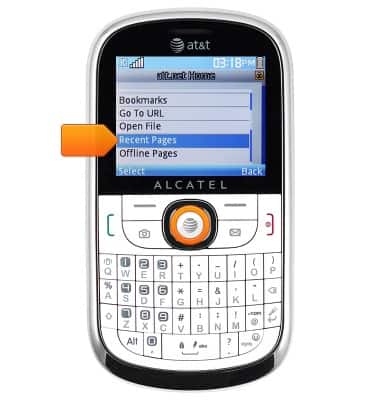
- Press the Left soft key.

- Scroll to 'Delete All', then press the Center nav key.

- Press the Center nav key to confirm.

- To edit browser settings, scroll to 'Settings', then press the Center nav key.

- To change the homepage, select 'Homepage', then press the Center nav key.

- Scroll to 'User Defined', then press the Center nav key.

- Enter the desired URL, then press the Center nav key.

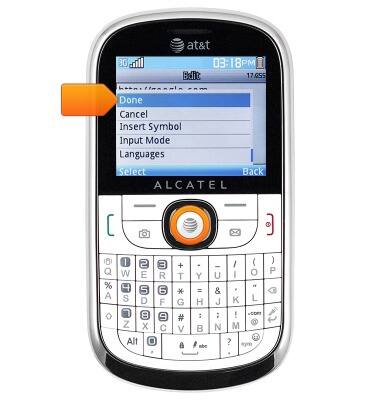
- Select 'Done', then press the Center nav key.
- Press the Right soft key to return to the Settings page.

- To adjust text display size, scroll to 'Browser Options', then press the Center nav key.
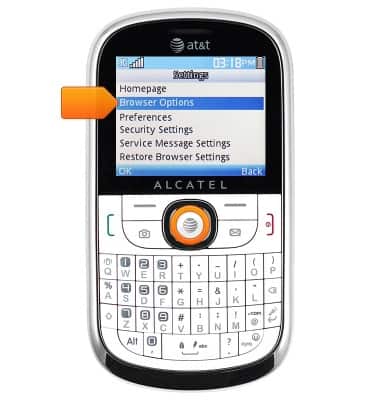
- Scroll to 'Font Size', then press the Center nav key.

- Scroll to the desired size, then press the Center nav key.

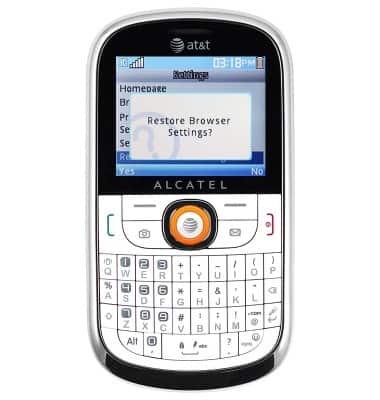
- To restore default browser settings, from the Settings menu, scroll to 'Restore Browser Settings', then press the Center nav key.
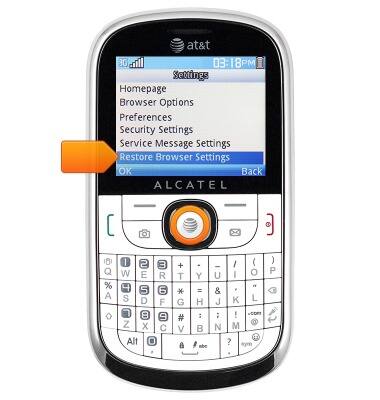
- Press the Center nav key to confirm.
Browser options
Alcatel 871A
Browser options
Access browser settings to delete browser history, set the home page, and more.
INSTRUCTIONS & INFO