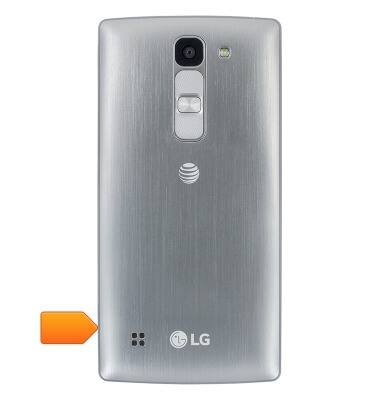
- Pry open and remove the Back cover using the indicated notch.
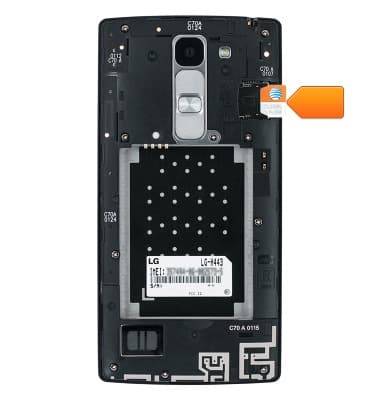
- Insert a Micro-SIM card into the SIM card slot as shown. Push the card into the slot until it is secured firmly in place.
- Insert a microSD card into the memory card slot as shown. Push the card into the slot until it is secured firmly in place.
Note: To prevent data corruption, it is recommended to unmount your memory card before removing it. To unmount your memory card, tap Settings > General > Storage > Unmount SD Card.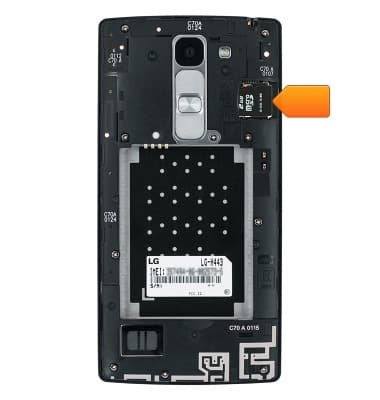
- Insert the Battery so that its contacts line up with those in the device interior.
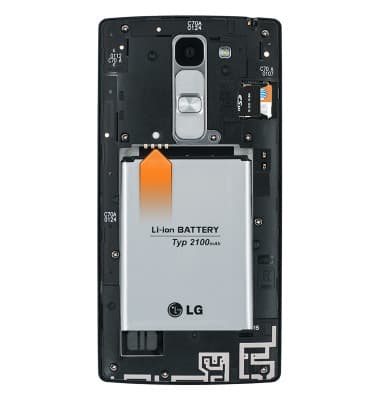
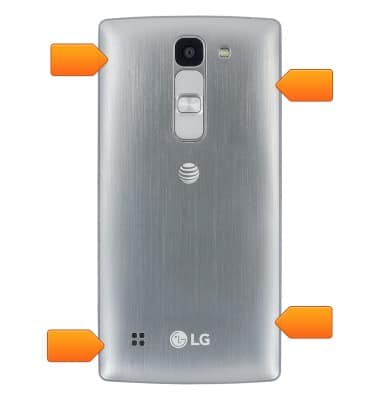
- Replace the Back cover. Press down around the edges of the device until the cover has clicked into place.
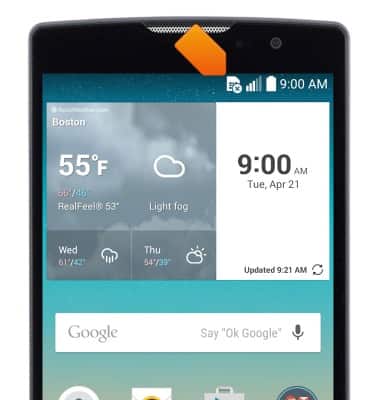
- If your device is powered on without a valid SIM card, the Missing SIM icon will display in the notification bar.
Phone assembly
LG Escape 2 (H443)
Phone assembly
How to install the battery, SIM, and memory card (for applicable devices).
Device Overview
This video explains how to insert the SIM card and turn the device on.
Device Overview
2:50
INSTRUCTIONS & INFO