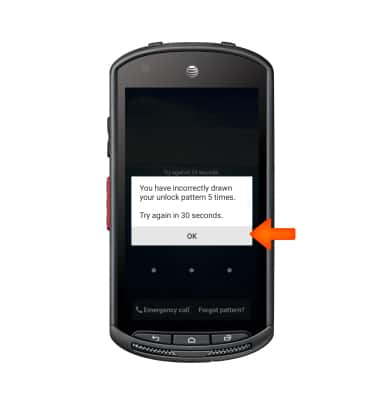
- After several attempts entering an incorrect Pattern lock, you will be informed that you have entered a Wrong Pattern.
Note: In order to reset your Pattern Lock using a back up PIN, you must first setup a back up PIN and Pattern Lock.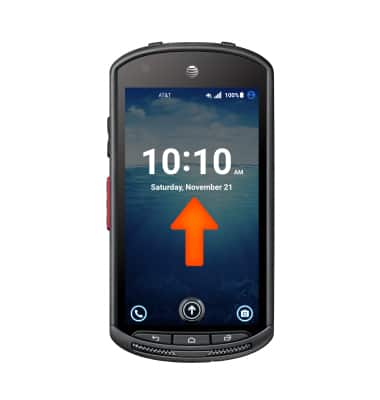
- Follow prompt and tap OK.
- Tap FORGOT PATTERN?
Note: The device must have already been associated with a Google account for the Forgot Pattern option to display.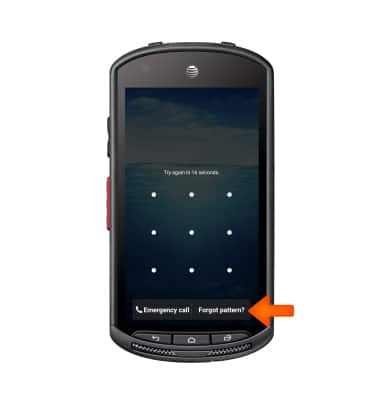
- Here enter your backup PIN and tap OK.
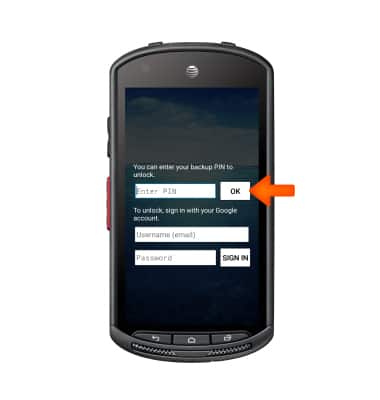
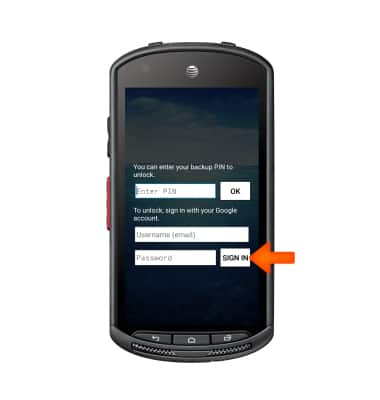
- If you do not remember your backup PIN, you may unlock the device using your Google account associated with the device. Enter your email information and tap SIGN IN.
Reset pattern lock
Kyocera DuraForce (E6560)
Reset pattern lock
Reset a forgotten pattern lock.
INSTRUCTIONS & INFO