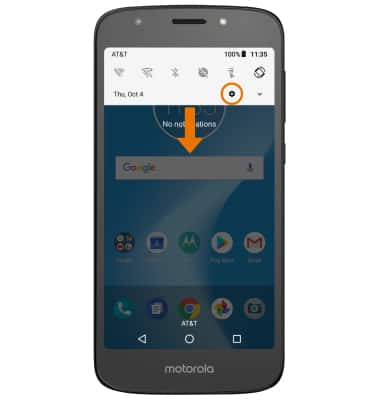
- Swipe down from the Notification bar, then select the Settings icon.
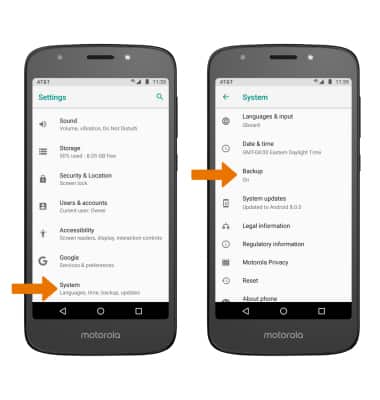
- Scroll to and select System, then select Backup.
- Select App data, then select the Automatic restore switch to ensure Automatic restore is on.
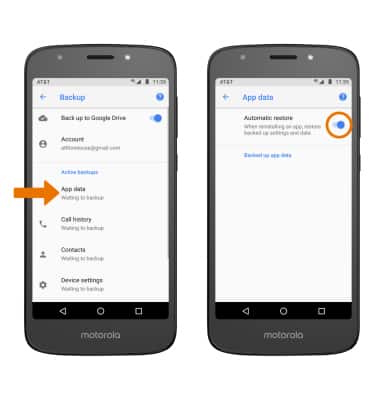
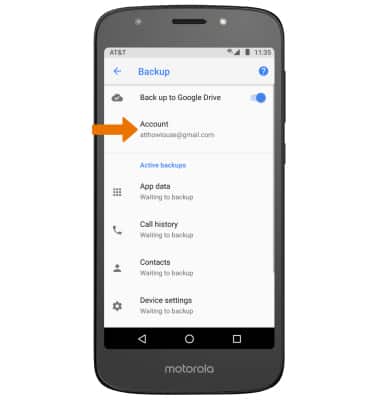
- If desired, select Account to ensure extra redundancy for backing up your data on the cloud.
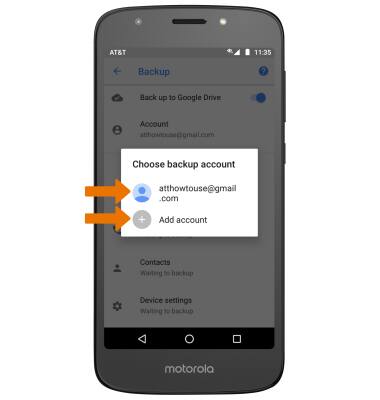
- Select the desired backup account option or select Add account to add a new backup account. When you add your Google account to a device, the data that you previously backed up for that Google account is restored to the device.
Backup & Restore with Google
Motorola Moto e5 play (XT1921-2)
Backup & Restore with Google
You can use Android Backup Service to back up data connected to one or more of your Google accounts. If you replace your device or erase its data, you can restore your data using the account(s) that you backed up.
INSTRUCTIONS & INFO

For more information, including what data and settings are restored, please see Back up or restore data on your device.