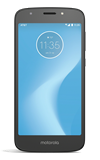
- TURN MOBILE HOTSPOT ON: Swipe down from the Notification bar, then select the Settings icon.
Note: Requires eligible data plan.
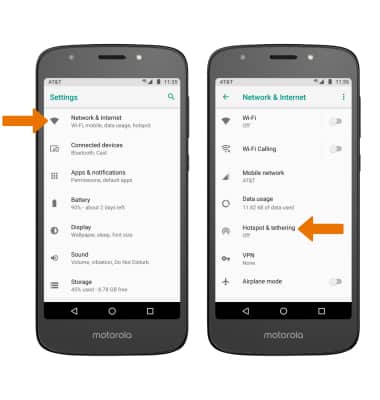
- Select Network & Internet, then select Hotspot & tethering.
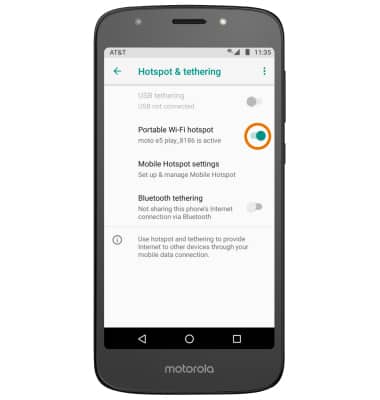
- ACTIVATE MOBILE HOTSPOT: Select the Portable Wi-Fi hotspot switch to turn Mobile Hotspot on or off.
Note: You will be prompted to turn off Wi-Fi when turning Mobile Hotspot on. Select OK.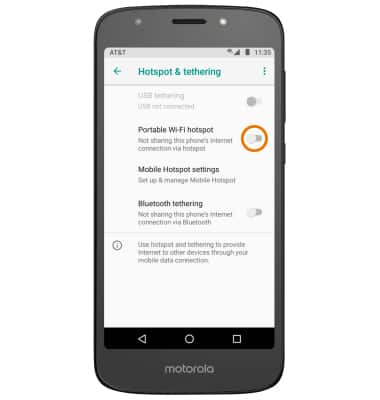
- ADJUST SETTINGS: Select Mobile Hotspot settings, then select Set up Wi-Fi hotspot.
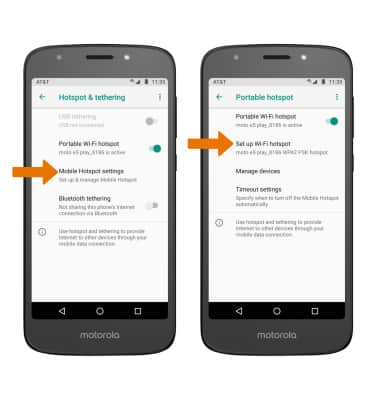
- Enter your desired hotspot settings (such as the hotspot name, security type, and password), then select SAVE.

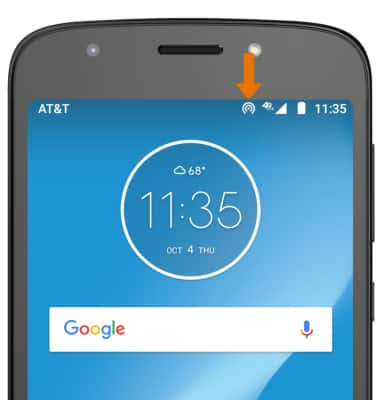
- When mobile hotspot is enabled, the Mobile hotspot icon will be displayed in the Notification bar.
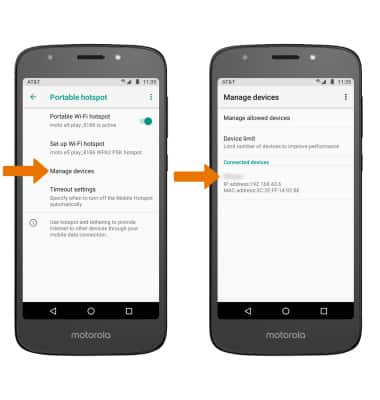
- VIEW CONNECTED DEVICES: From the Portable hotspot screen, select Manage devices to view the Connected devices list.
- TURN OFF MOBILE HOTSPOT: From the Hotspot & tethering screen, select the Portable Wi-Fi hotspot switch.
Mobile Hotspot
Motorola Moto e5 play (XT1921-2)
Mobile Hotspot
Set up your device as a personal hotspot and share your data connection with Wi-Fi-capable devices.
Wi-Fi & Mobile Hotspot
Set up your device as a personal hotspot and share your data connection with Wi-Fi-capable devices.
Wi-Fi & Mobile Hotspot
2:40
INSTRUCTIONS & INFO