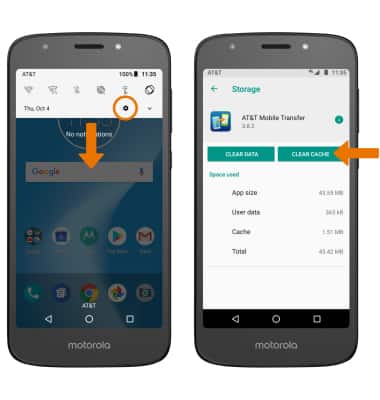
- CLEAR APP CACHE: Swipe down from the Notification bar, then select the Settings icon > Storage > desired location > desired app > CLEAR CACHE.
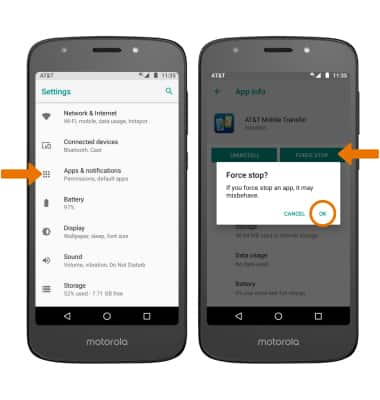
- FORCE STOP AN APP: From the Settings screen, select Apps & notifications > App info > desired app > FORCE STOP. Select OK to confirm.
- CHECK FOR APP UPDATE: From the home screen, select the Play Store app > Menu icon > My apps & games > UPDATE.
Note: Select UPDATE ALL to download all available app updates.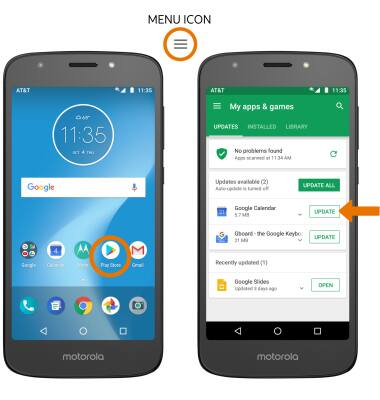
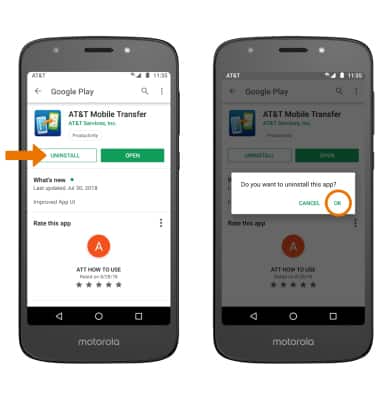
- REMOVE AN APP: From the desired app's Play Store page, select UNINSTALL then select OK to confirm.
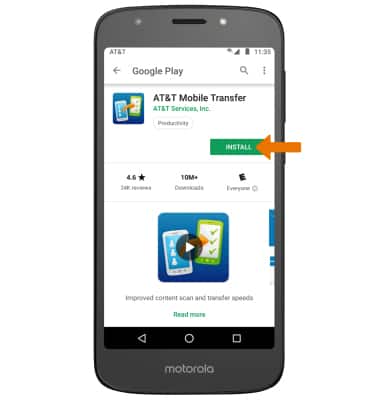
- REINSTALL AN APP: Select INSTALL from the desired app page to reinstall.
App Troubleshooting
Motorola Moto e5 play (XT1921-2)
App Troubleshooting
Clear the app cache, force stop an app, check for updates, remove an app, and reinstall an app.
INSTRUCTIONS & INFO