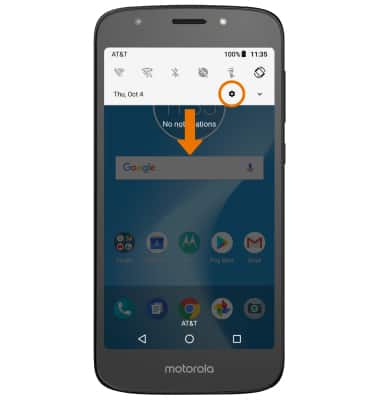
- VIEW AVAILABLE MEMORY: Swipe down from the Notification bar, then select the Settings icon.
- Select Storage. Available internal memory and portable storage memory space will be listed.
Note: If a SD card is not installed, you will automatically be brought to the Internal shared storage screen.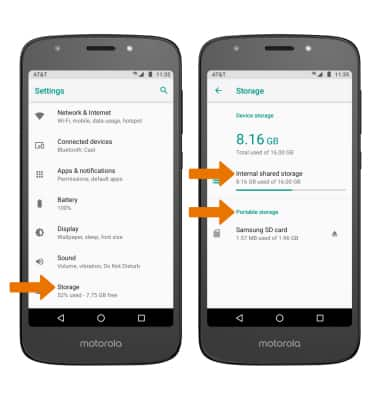
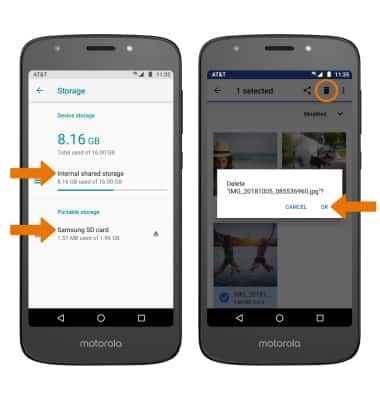
- FREE UP MEMORY: From the Storage screen, select the desired storage location > desired file type > select and hold the desired file(s) > select the Delete icon > select OK to confirm.
- REMOVE UNUSED APPS: From the Settings screen, select Apps & notifications > App info > desired app > UNINSTALL.
Note: Select OK to confirm.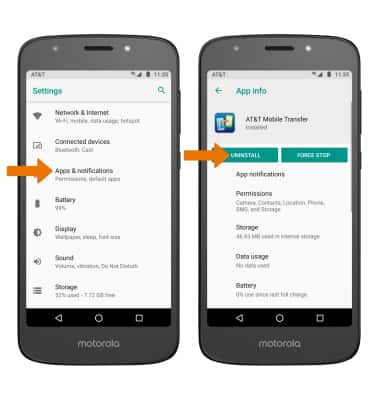
- CLEAR APP DATA: From the App info screen, select Storage. Select CLEAR DATA or CLEAR CACHE.
Note: If CLEAR DATA was selected, you will be prompted to select OK to confirm.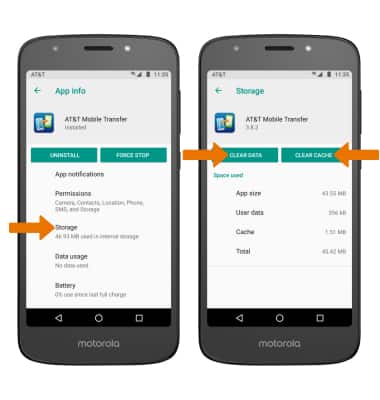
- ADDITIONAL STORAGE: Purchase an SD card or download a cloud storage app from the Play Store.
Note: For more information on storing data to a memory/microSD card, see the Backup & Restore with a Memory Card tutorial.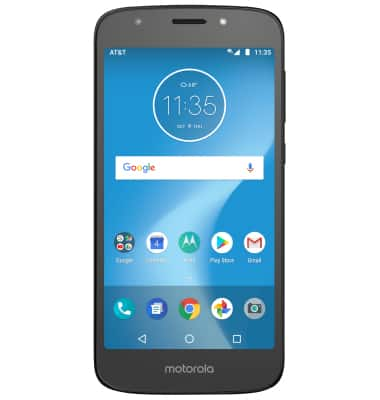
Available Memory
Motorola Moto e5 play (XT1921-2)
Available Memory
Check the available device storage.
INSTRUCTIONS & INFO
 This device is available with 16GB of internal memory and the option to add a microSD card up to 128GB. MicroSD cards are sold separately.