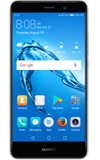
- VIEW DATA USAGE: Swipe down from the Notification bar, then select the Settings icon. Select Mobile data.
Note: To check your current month's data usage dial *data# (*3282#) on your mobile phone to receive a text message with the current bill cycle's usage.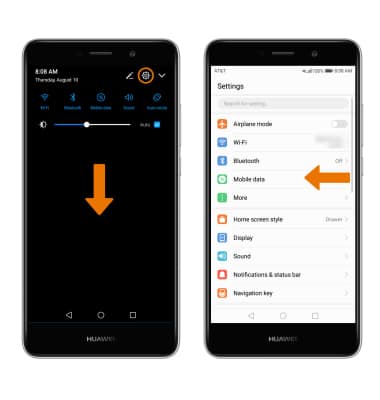
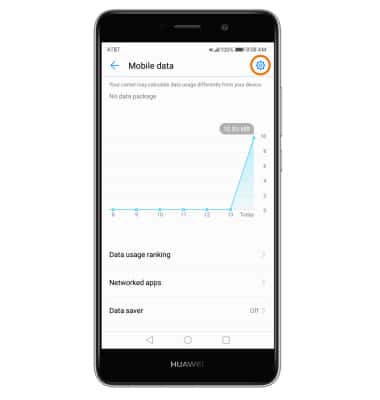
- SET MONTHLY DATA LIMIT: From the Mobile data screen, select the Settings icon.
- Select Total monthly data available. Enter the desired limit, then select OK.
Note: When the mobile data limit is active and has been reached, the mobile data block will remain in effect until mobile data is manually re-enabled on the device, the limit threshold is changed to a higher value, or a new data usage cycle begins. If you set data usage limits on your device, they do not communicate with AT&T systems. You will still receive AT&T system generated notifications as you approach your data limits.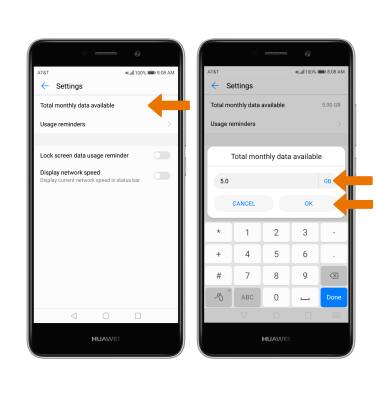
- SET DATA USAGE WARNING: Select Usage reminders. Select and drag the sliders left or right to set the desired Monthly and Daily reminder limits.
Note: Usage reminders will only be present when a monthly data limit is set.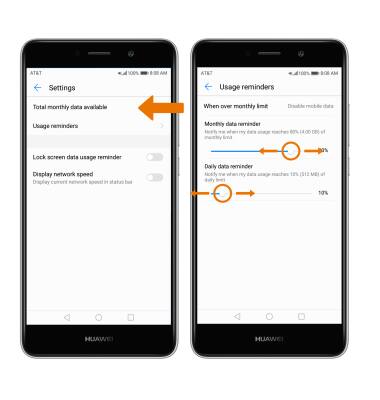
- VIEW DATA USAGE BY APP: From the Mobile data usage screen, select Data usage ranking. Mobile data usage by app will be displayed.
Note: To restrict apps from using data while running in the background, select Data saver > Data saver switch ON. Your myAT&T account is also another way to manage your wireless usage.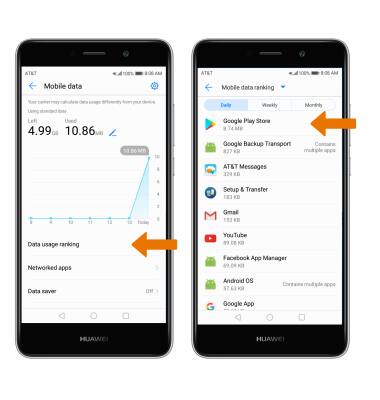
View & Manage Data
Huawei Ascend XT2 (H1711)
View & Manage Data
Access Usage Manager to view data usage, set data limits, and see the apps using the most data.
INSTRUCTIONS & INFO