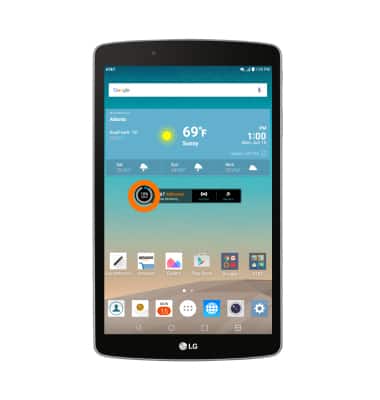
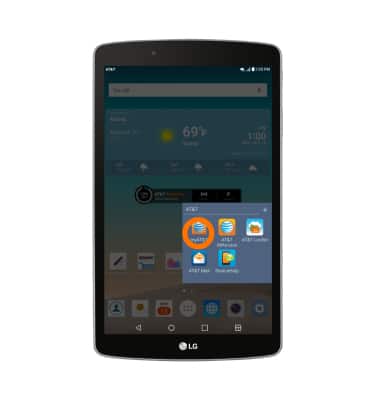
- To view data usage via the Usage Manager, from the homescreen tap the AT&T AllAccess Widget.
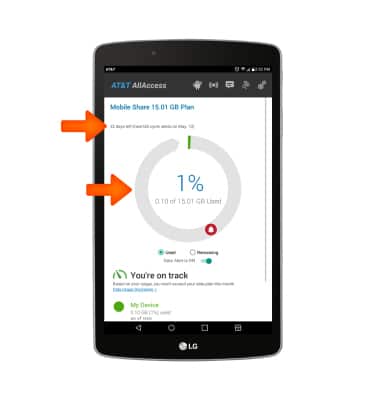
- Here you can view your data usage and billing cycle.
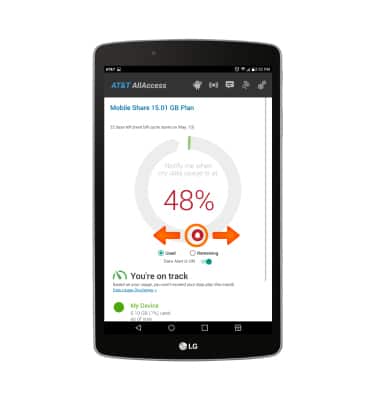
- To set data limit alerts tap and drag the Alert icon to the Desired percentage.
Note: When the mobile data limit is active and has been reached, the mobile data block will remain in effect until mobile data is manually re-enabled on the device, the limit threshold is changed to a higher value, or a new data usage cycle begins. If you set data usage limits on your device, they do not communicate with AT&T systems. You will still receive AT&T system generated notifications as you approach your data limits.
- Your myAT&T account is also another way to manage your wireless usage.
View & Manage Data
LG G Pad F 8.0 (V495)
View & Manage Data
Access Usage Manager to view data usage, set data limits, and see the apps using the most data.
INSTRUCTIONS & INFO

Starting December 31, 2022, the AT&T AllAccess app is going away. As a result, some features on your device may no longer be supported. You'll be able to view data usage and notifications on your myAT&T account page, and you can explore other options to stay connected with your device on the go. Learn more about mobile hotspot options.