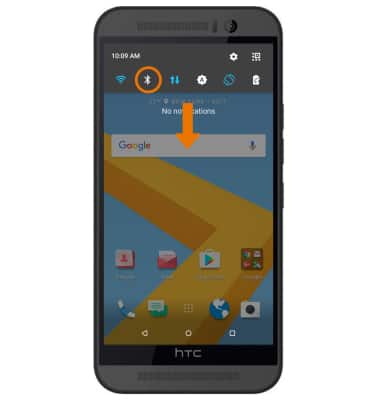
- QUICKLY ENABLE/DISABLE BLUETOOTH: Swipe down from the Notification bar, then select the Bluetooth icon.
- While Bluetooth is enabled, the Bluetooth icon will be displayed in the Notification bar.
Note: To optimize battery life, turn Bluetooth off when not in use.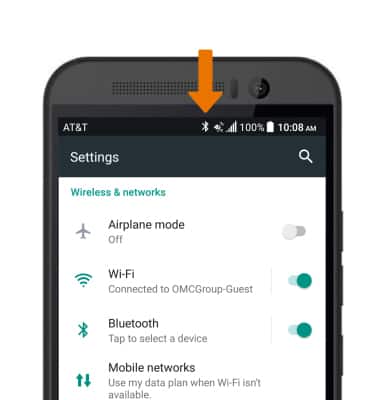
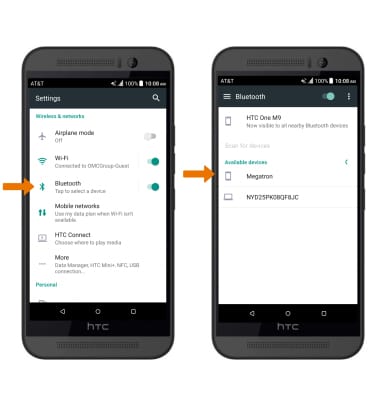
- PAIR WITH DEVICE: Select Bluetooth from the Settings menu. Bluetooth will automatically scan for devices. Select the desired device to pair with it.
- Select PAIR when prompted to request a pairing.
Note: You may be prompted to enter a passcode (common default passcode is 0000).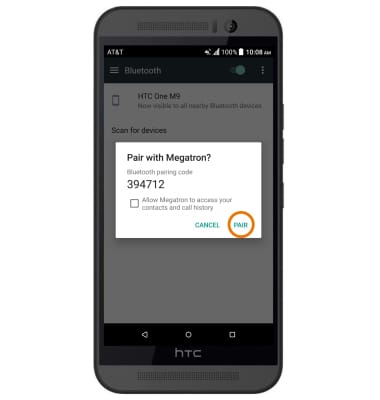
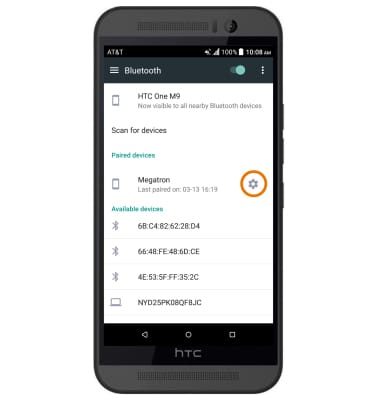
- ADJUST SETTINGS OR UNPAIR DEVICE: Select the Settings icon next to the desired paired device.
- Adjust settings as desired. Select UNPAIR to unpair the device.
Note: If having trouble pairing/unpairing your device with your vehicle, please refer to your vehicle's user manual for additional information.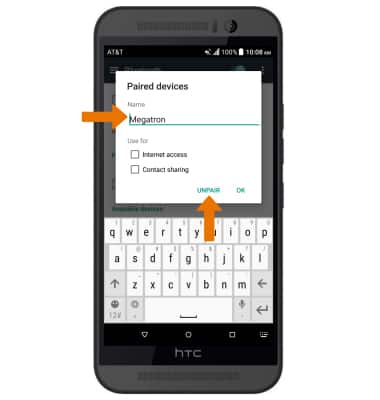
Bluetooth
HTC One M9 (0PJA110)
Bluetooth
Turn Bluetooth on or off, scan and connect to other Bluetooth devices, and unpair a connected device.
INSTRUCTIONS & INFO