- From your device's web browser, go to http://attwifimanager. Enter your Username and Password, then click SIGN IN.
Note: Ensure that your device is connected to the Netgear Nighthawk's Wi-Fi network. For more information, please see the Connect Devices to Wi-Fi or Connect PC or Mac to Wi-Fi tutorials.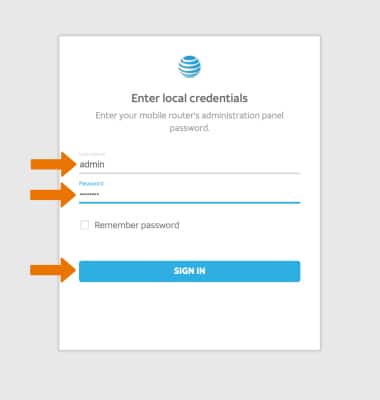
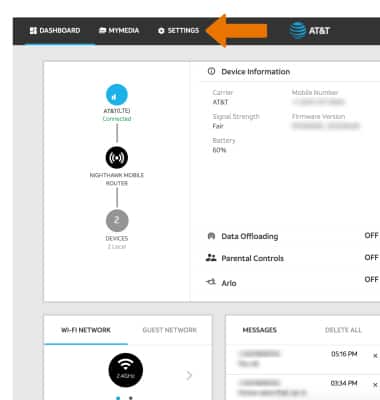
- Click SETTINGS at the top of the page.
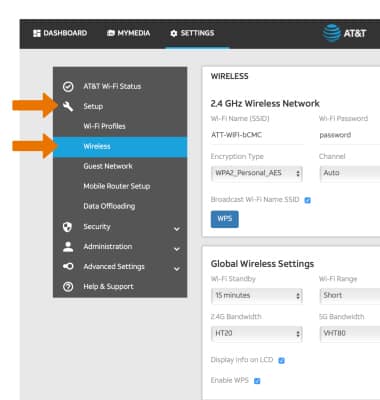
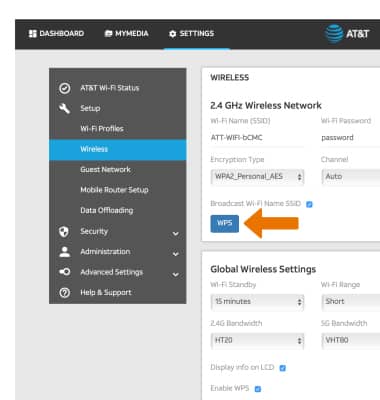
- Click Setup, then click Wireless.
- Click WPS.
- Click the desired connection option.
Note: For this tutorial, Enter WPS PIN was chosen.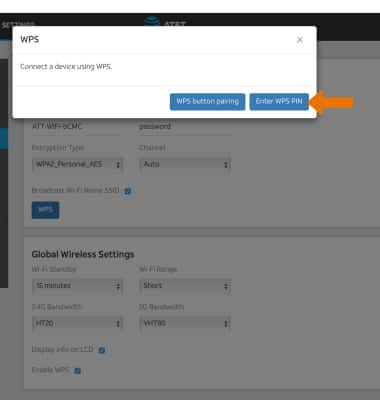
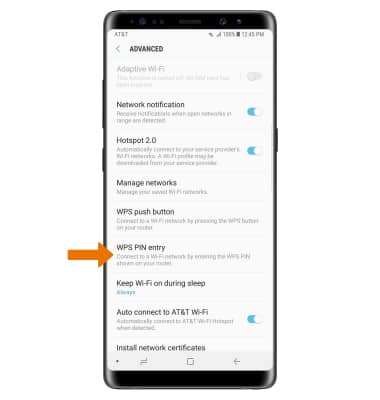
- On the WPS-enabled device, navigate to and select the connection option. Follow the prompts to complete setup.
Connect WPS Devices
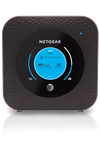
Netgear Nighthawk LTE Mobile Hotspot Router (MR1100)
Connect WPS Devices
Learn how to connect WPS devices.
INSTRUCTIONS & INFO