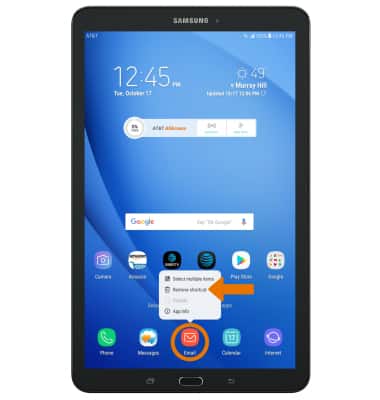
- REMOVE APP ICONS FROM THE HOME SCREEN: Select and hold the desired app, then select Remove shortcut.
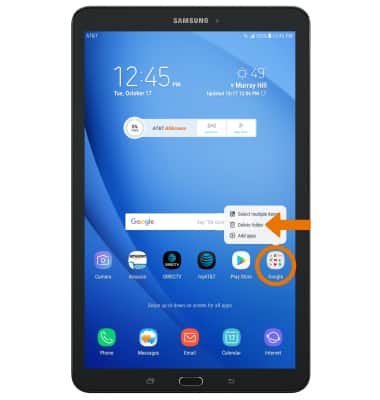
- REMOVE FOLDERS FROM THE HOME SCREEN: Select and hold the desired folder, then select Delete folder.
- UNINSTALL AN APP: Select and hold the desired app, then select Uninstall.
Note: Some pre-installed applications cannot be uninstalled from the device but can be disabled. Some applications must remain enabled on the device.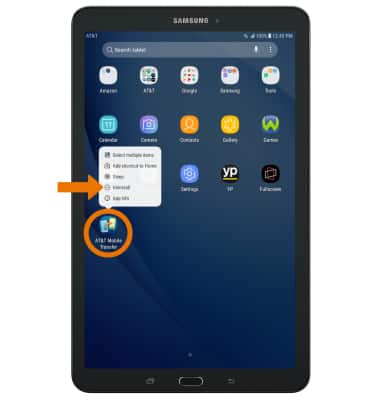
- Select OK.
Note: Downloaded applications can be re-installed through the Google Play Store. To re-enable a pre-loaded application, swipe down from the Notification bar then select the Settings icon > Apps > desired app > Enable.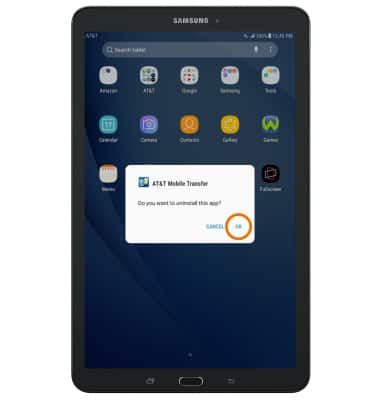
Remove An App
Samsung Galaxy Tab E 8.0 (T377A)
Remove An App
Remove an icon from your home screen and delete apps from your device.
INSTRUCTIONS & INFO