In this tutorial, you will learn how to:
• Access contacts
• Add a contact
• Edit or delete a contact
• Add a ringtone to a contact
• Backup your contacts
Access contacts
From the home screen, swipe up or down from the center of the screen to access the Apps tray, then select the  Contacts app.
Add a contact
1. Select the  Add icon. Select the desired save location, then select the desired option.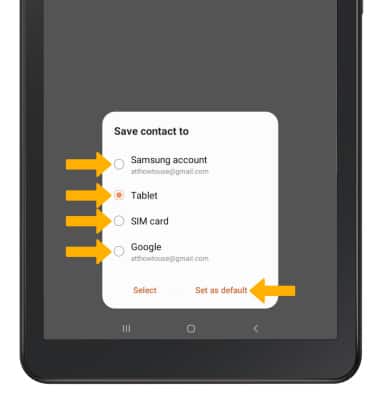
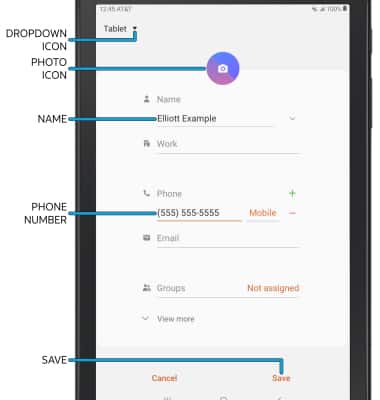
2. Enter the desired contact information in the corresponding fields. Select the drop-down icon to change the desired account you want to save the contact to. To add a picture, select the Photo icon then navigate to the desired image. Select Save when finished.
Edit or delete a contact
EDIT CONTACT: Select the desired contact, then select Edit. Edit the contact as desired, then select Save.
DELETE CONTACT: Select the  Menu icon, then select Delete. Select Delete again to confirm.
Add a ringtone to a contact
From the edit contact screen, scroll to and select View more then scroll to and select Ringtone. Select the desired Ringtone, then select OK.
Backup your contacts
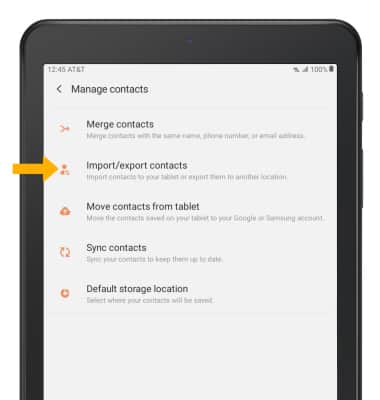
1. From the Contacts screen, select the  Menu icon the select Manage contacts.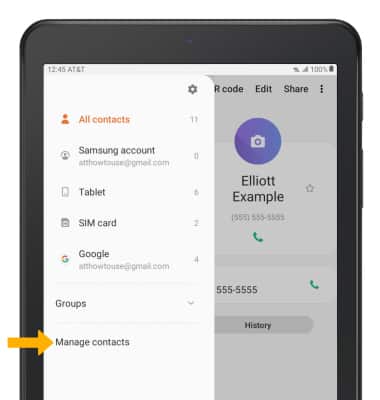
2. Select Import/export contacts, then follow the prompts.