 Samsung SmartThings allows you to wirelessly connect your device with a whole range of smart devices and lets everything work together. For more information, visit
 • Access Samsung SmartThings
• Add a device to Samsung SmartThings
• Edit Samsung SmartThings settings
Access Samsung SmartThings
1. From the home screen, swipe up or down from the center of the screen the access the Apps tray.
2. Navigate to and select the SmartThings app.
3. Select Start.
Note: To access Samsung SmartThings, you must first be signed into your Samsung account. If you have not already signed into your Samsung account, you will be greeted with a Sign in screen upon initial access of Samsung SmartThings. Enter your account information, then review the Terms and Conditions and Privacy Policy as desired.
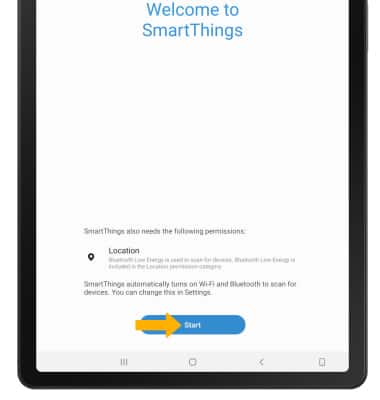
2. Navigate to and select the
SmartThings app. 3. Select Start.
Note: To access Samsung SmartThings, you must first be signed into your Samsung account. If you have not already signed into your Samsung account, you will be greeted with a Sign in screen upon initial access of Samsung SmartThings. Enter your account information, then review the Terms and Conditions and Privacy Policy as desired.
Add a device to Samsung SmartThings
Select the  Add icon. Select the desired available device or add a device manually by selecting the corresponding device type, then follow the prompts to complete set up.
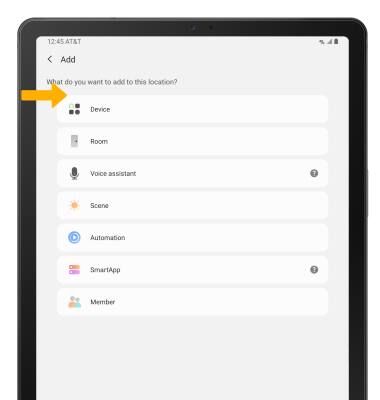
Add icon. Select the desired available device or add a device manually by selecting the corresponding device type, then follow the prompts to complete set up. Edit Samsung SmartThings settings
1. From the SmartThings screen, select the  Menu icon then select the
  Settings icon.
2. Edit settings as desired.
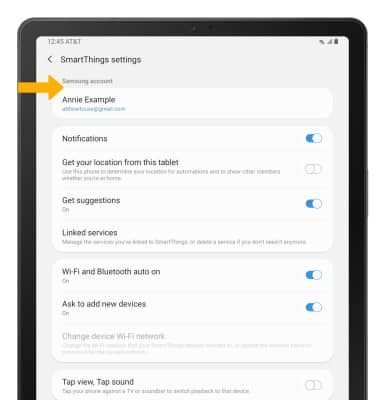
Menu icon then select the Settings icon. 2. Edit settings as desired.