- ACCESS TV MODE: Press the Quick Launch button on top of the device.
Note: Alternately, from the home screen swipe right or from the lock screen select and hold the TV Mode icon. You can use Split screen mode while using a TV Mode app.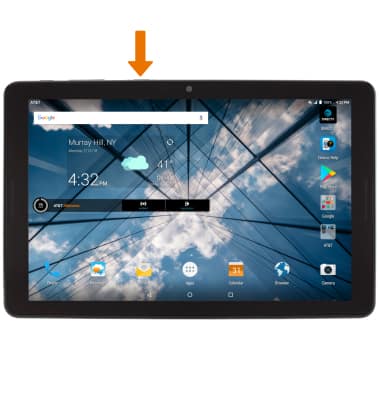
- CHANGE DEFAULT APP: From the home screen, swipe down from the Notification bar then select the Settings icon.
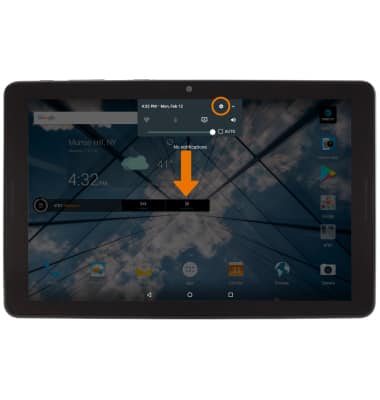
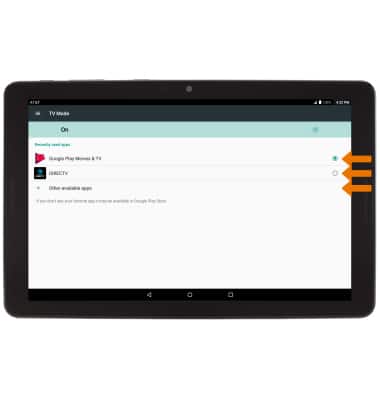
- Scroll to and select TV mode.
Note: If you do not see the desired app, from the TV Mode screen select Other available apps then select the desired app.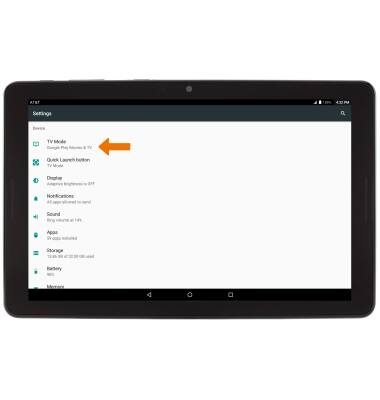
- Select the desired app.
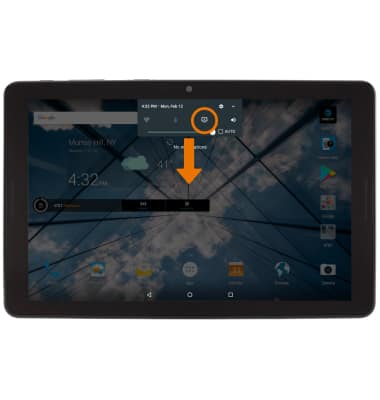
- QUICKLY ENABLE/DISABLE TV MODE: From the home screen, swipe down from the Notification bar then select the TV MODE icon.
TV Mode
AT&T Primetime (K92)
TV Mode
How to set up and access TV Mode, adjust settings, and Enable/Disable using Quick Settings.
TV Mode
How to set up and access TV Mode, adjust settings, and Enable/Disable using Quick Settings.
TV Mode
1:13
INSTRUCTIONS & INFO