Deals
iPhone deals
Samsung Galaxy deals
Cyber Monday deals
Business employee
55+
Military
Active first responders
Retired responders
Nurses & physicians
Teachers
Union
Credit card
&More Benefits
Explore wireless
Phone plans
New phones & devices
Upgrade
Bring your own phone
Add a Line
Switch and save
Trade in your device
International phone plans
Shop new iPhones
Shop Certified Pre-Owned
iPhone 17
Samsung Galaxy S25
Why AT&T Wireless
Wireless help
More resources
Explore home internet
Internet plans
Fiber internet
Home Wi-Fi
Check availability
AT&T Internet Air
Moving services
Bundles
Gaming
Home business
Internet help
Speed test
More resources
Access from AT&T
Explore AT&T PREPAID
Prepaid plans
Prepaid phones
Bring your own phone
Prepaid deals
Prepaid account
Activate your service
Lease-to-Own
Home Phone Services
AT&T Phone
AT&T Phone – Advanced
Landline Phone
Lifeline
Phones & accessories
Digital phone help
Landline phone help
Bundles
Internet + Wireless
Internet + Phone
Home office
Smart watches & devices
Smart home
In-car Wi-Fi
All accessories
Headphones
Phone & tablet cases
Chargers
Screen protectors
Speakers & smart home
Internet & TV equipment
PopSockets & more
Gadgets & gaming
Accessory deals
Access, Store Photos & Videos
Samsung Galaxy Note8 (N950U)

Access, Store Photos & Videos

Learn how to access and store Photos & Videos.

INSTRUCTIONS & INFO
  1. From the home screen, select the Camera app then select the Settings icon.

    Note: Alternately, you can access the camera from the lock screen by selecting and dragging the Camera icon up.
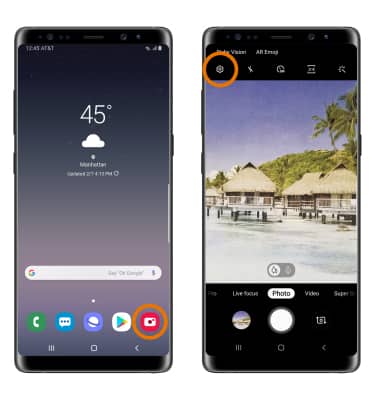
    step 1

  2. SET STORAGE LOCATION: Scroll to and select Storage location, then select the desired location.

    Note: Storage location is only accessible if an SD card is installed.
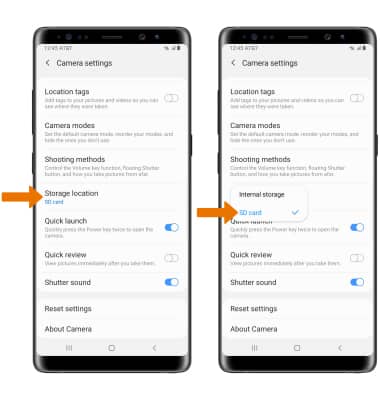
    step 2

  3. ACCESS PHOTOS/VIDEOS: From the Camera app, select the Gallery icon.

    Note: Alternately, from the home screen swipe up or down from the center of the screen to access the Apps tray then select the Gallery app.
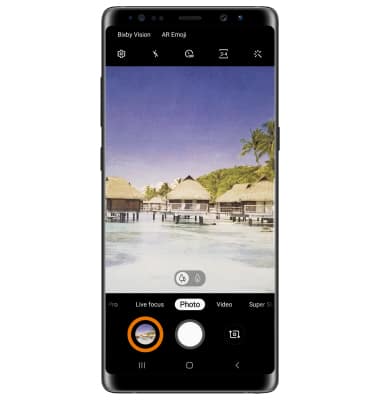
    step 3

Did you get the help you needed?


Did you get the help you needed?