


• View and manage power consumption
• Enable battery saver mode
• Turn off unused services and activate Airplane mode
• Change display settings
View and manage power consumption
Use the original charger and battery to maintain optimal battery performance over the life of your device. The battery comes partially charged. Battery life and charge cycles vary by use and settings.
Enable battery saver mode
1. From the clock screen, press the Power/Home button then double tap the
 Settings app.
2. Scroll to and select Battery.
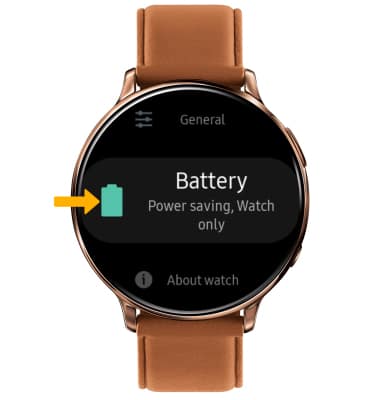
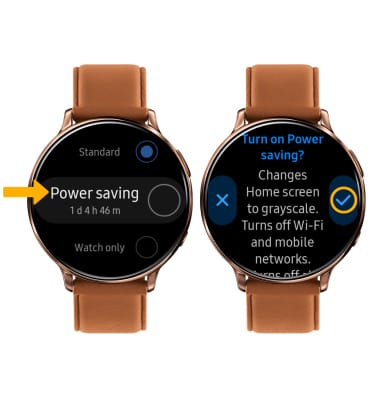
3. Scroll to and select Power saving. Review the Power saving prompt, then select the Checkmark icon.
Note: Alternatively, swipe down from the top of the screen to access the Moments bar. Swipe left, then select the Power saving icon. Select the Checkmark icon to put the watch into power saving mode. Battery-smart features can help save your battery for what matters most. Power saving mode turns off Wi-Fi and mobile network and turns off all functions except calls, messages and notifications.
Turn off unused services and activate Airplane mode
Swipe down from the top of screen to access the Moments bar, then swipe left. If enabled, select Wi-Fi. Swipe left again and select the location icon to disable.

If you are traveling and do not have access to mobile or Wi-Fi networks, enable Airplane mode. Select the Airplane mode icon.

Change display settings
To extend battery life, set the screen to a lower brightness and decrease screen timeout. From the Settings screen, scroll to and select Display.

To lower screen brightness, select Brightness then use the Remove icon to lower the brightness.

To change Screen timeout, scroll to and select Screen timeout. Select a lower screen timeout option.

To lower screen brightness, select Brightness then use the Remove icon to lower the brightness.
To change Screen timeout, scroll to and select Screen timeout. Select a lower screen timeout option.