
In this tutorial, you will learn how to:
• Backup or restore photos & files
• Access LG backup & restore
Backup or restore photos & files
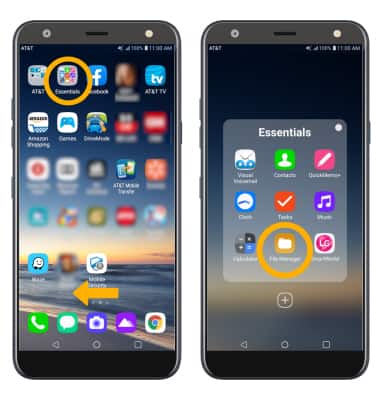
1. From the home screen, swipe left then select the Essentials folder. Select the File Manager app.
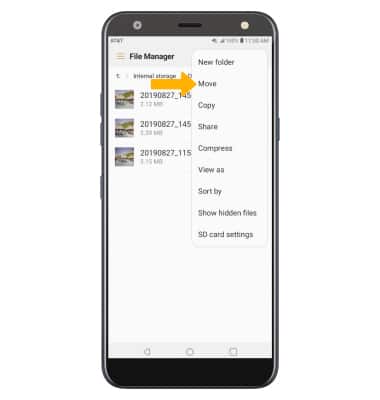
2. Navigate to the desired file(s). Select the Menu icon, then select Move.
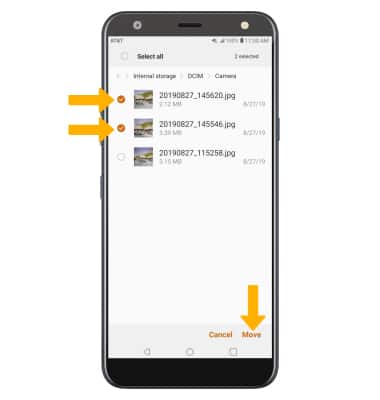
3. Select the desired files, photos, or music, then select Move.
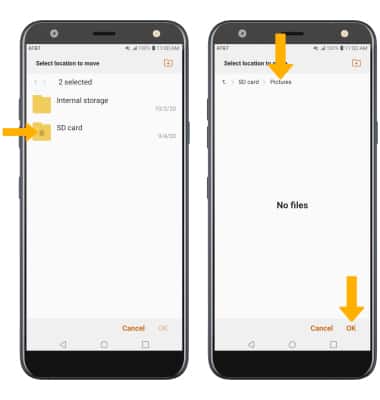
4. Select SD card, then navigate to the desired location. Select OK.
2. Navigate to the desired file(s). Select the
Menu icon, then select Move.3. Select the desired files, photos, or music, then select Move.
4. Select SD card, then navigate to the desired location. Select OK.
Access LG Backup & restore
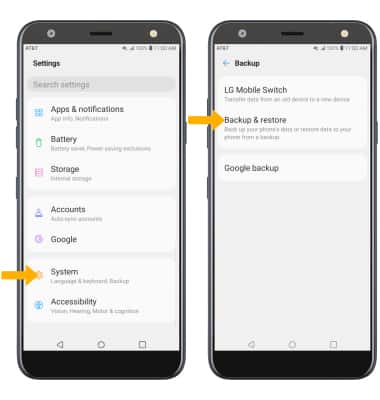
Swipe down from the Notification bar, then select the  Settings icon located in the upper right corner of the notification bar. Scroll to and select System > Backup > select Backup & restore then follow the prompts.