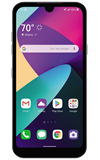

In this tutorial, you will learn how to:
• View data usage
• View data usage by app
• Change displayed billing cycle
• Access and set data warning or data limit
View data usage
1. Swipe down from the Notification bar, then select the  Settings icon.
Settings icon.2. Select Network & internet, then select Data Manager.
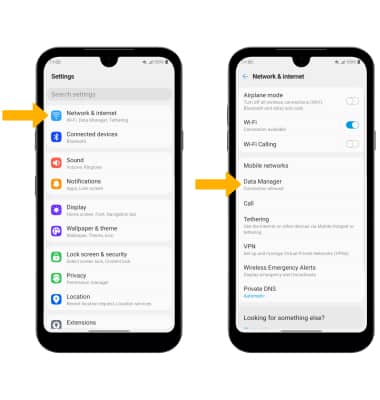
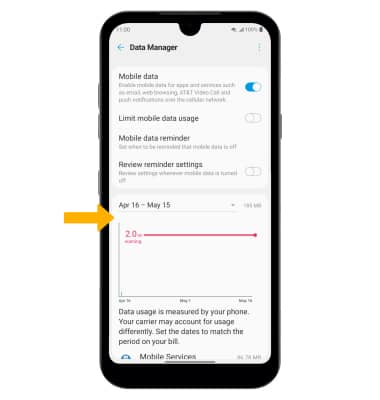
3. Mobile data usage will be displayed.
View data usage by app
From the Data Manager screen, scroll to view data usage broken down by application.
Note: To restrict apps from using data while running in the background, swipe down from the Notification bar then select the Settings icon > Network & internet > Data Manager >  Menu icon > Data Saver > Data saver switch. Your myAT&T account is also another way to manage your wireless usage.
Settings icon > Network & internet > Data Manager > Menu icon > Data Saver > Data saver switch. Your myAT&T account is also another way to manage your wireless usage.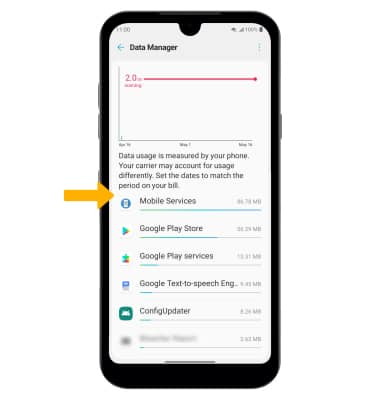
Change displayed billing cycle
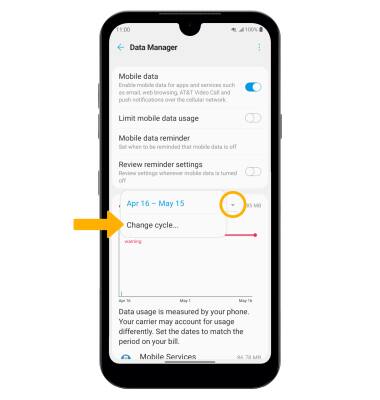
From the Data Manager screen, select the Data usage drop down icon then select Change cycle....
Set a data warning or data limit
Select the desired option.
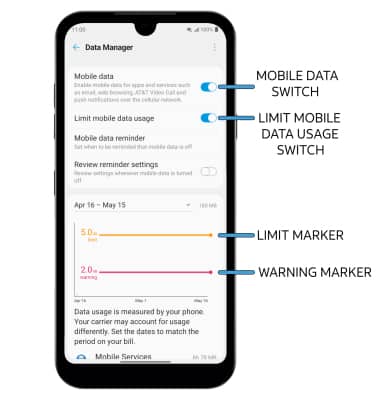
• TURN ON/OFF MOBILE DATA: Select the Mobile data switch.
• SET DATA WARNING: Select and drag the Warning marker up or down to set the monthly data warning.
• ENABLE/DISABLE DATA LIMIT: Select the Limit mobile data usage switch.
• SET MONTHLY DATA LIMIT: When the Limit mobile data usage switch is enabled, select and drag the Limit marker up or down.
Note: You will receive a Limit data usage prompt, select OK to continue. When the mobile data limit is active and has been reached, the mobile data block will remain in effect until mobile data is manually re-enabled on the device, the limit threshold is changed to a higher value, or a new data usage cycle begins. If you set data usage limits on your device, they do not communicate with AT&T systems. You will still receive AT&T system generated notifications as you approach your data limits.