
In this tutorial you will learn how to:
• Block numbers
• Unblock numbers
Blocked numbers
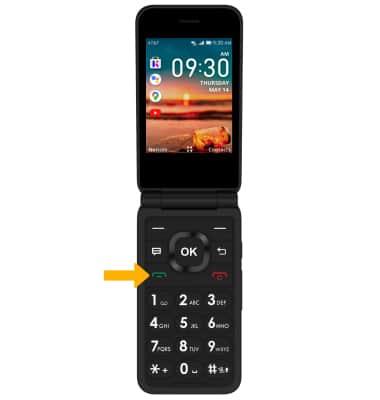
1. From the home screen, press the Place/Answer Call button to access the Call log.
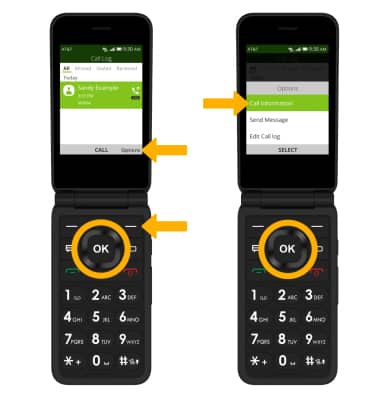
2. Press the navigational buttons to highlight the desired call, then press the right menu button to select Options. Press the OK key to select Call Information.
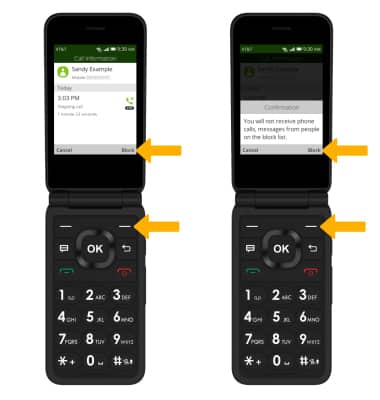
3. Press the right menu button to select Block, then press the right menu button again to confirm.
2. Press the navigational buttons to highlight the desired call, then press the right menu button to select Options. Press the OK key to select Call Information.
3. Press the right menu button to select Block, then press the right menu button again to confirm.
Unblock numbers
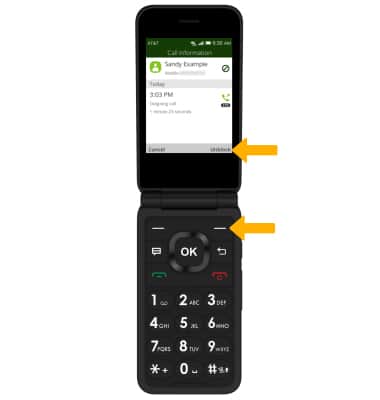
From the desired call, press the right menu button to select Unblock.