In this tutorial, you will learn how to:
• Block numbers
• Unblock numbers
• Block unknown numbers
Block numbers
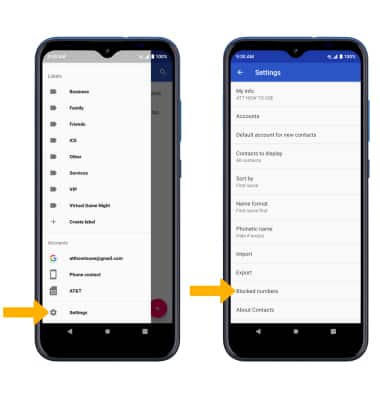
1. From the home screen, select the  Contacts app. Select the
  Menu icon, then scroll to and select Settings. Select Blocked numbers.
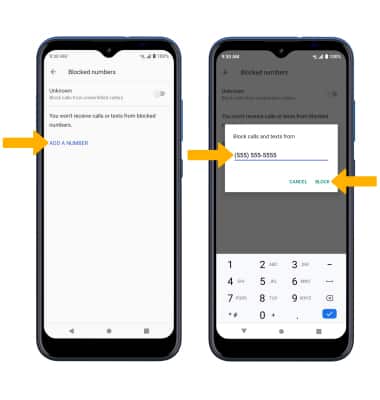
2. Select ADD A NUMBER. Enter the desired number, then select BLOCK.
Contacts app. Select the Menu icon, then scroll to and select Settings. Select Blocked numbers. 2. Select ADD A NUMBER. Enter the desired number, then select BLOCK.
Unblock numbers
From the Blocked numbers screen, select the X icon then select UNBLOCK. 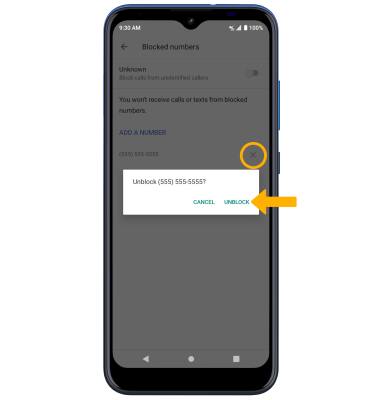
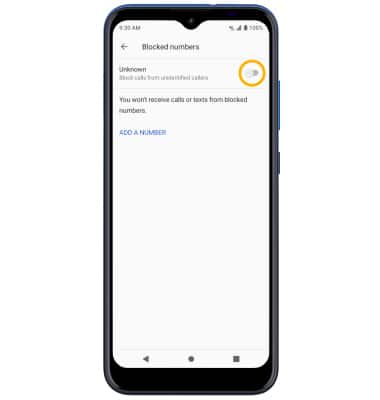
Block unknown numbers
From the Blocked numbers screen, select the Unknown switch.