

• Locate SIM & microSD tray
• Insert or remove SIM & microSD card
No SIM card will be displayed in the Notification bar when there is no SIM card in the device.
Locate SIM & microSD tray
The SIM & microSD tray is located on the left side of the device. To insert a SIM or microSD card, insert a SIM tool into the small hole to eject the SIM & microSD tray.
Note: To prevent data corruption, it is recommended to unmount your memory card before removing it. To unmount your memory card, from the home screen swipe down from the Notification bar with two fingers, then select the  Settings icon > Storage >
  Eject icon.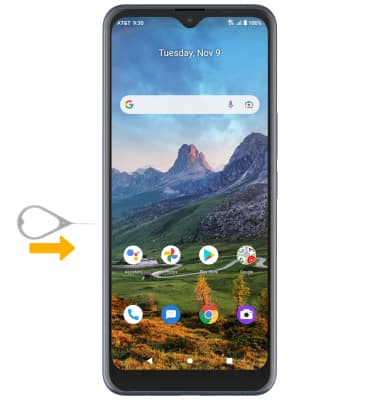
Insert or remove SIM & microSD card
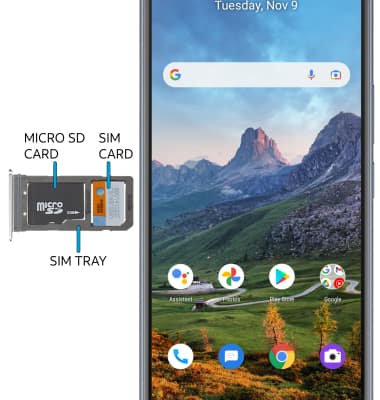
• INSERT/REMOVE SIM CARD: Insert or remove the Nano SIM card into the SIM tray with the gold contacts facing down and the notched edge in the lower right. Gently press the SIM card in until it clicks into place.
• INSERT/REMOVE MICROSD CARD: Insert or remove the microSD card into the SIM tray with the gold contacts facing down and the notched edge on the lower right. Gently press the microSD card in until it clicks into place.
• INSERT/REMOVE MICROSD CARD: Insert or remove the microSD card into the SIM tray with the gold contacts facing down and the notched edge on the lower right. Gently press the microSD card in until it clicks into place.
Storage
Internal Memory: Up to 64GB
External Memory: [missing from monobrief]
External Memory: [missing from monobrief]