In this tutorial, you will learn how to:
• Take a screenshot
• Edit or share screenshots immediately
• Access and use screen recording
Take a screenshot
Press and hold the Power/Lock and Volume down buttons simultaneously.
Note: To access screenshots, from the home screen, select the  Photos app > Library tab > Screenshots.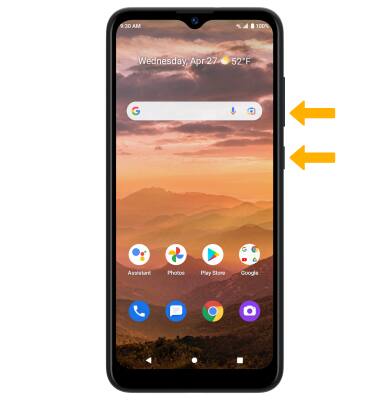
Edit or share screenshots immediately
Immediately after taking a screenshot, a notification will appear on the screen. Select the desired option:
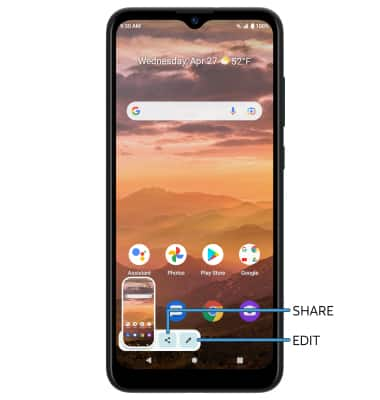
• SHARE A SCREENSHOT: Select Share, then follow the prompts to share.
• EDIT A SCREENSHOT: Select Edit, then edit screenshot as desired.
• EDIT A SCREENSHOT: Select Edit, then edit screenshot as desired.
Access and use screen recording
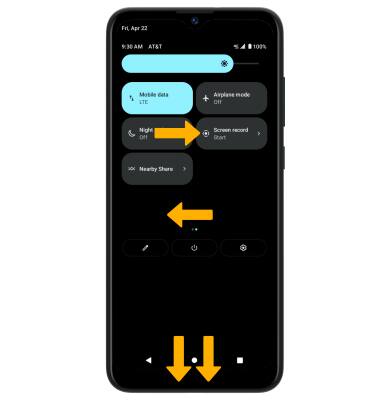
1. Screen recording lets you capture what’s happening on your phone. To access screen recording, swipe down from the Notification bar twice then swipe left. Select the Screen record icon.
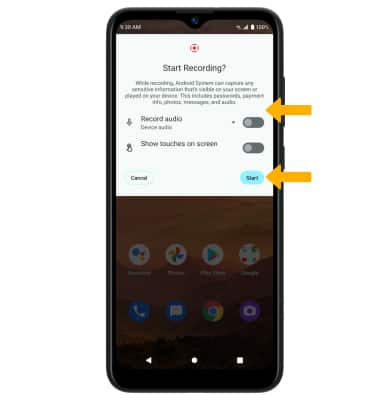
2. Select the desired switches, then select Start.
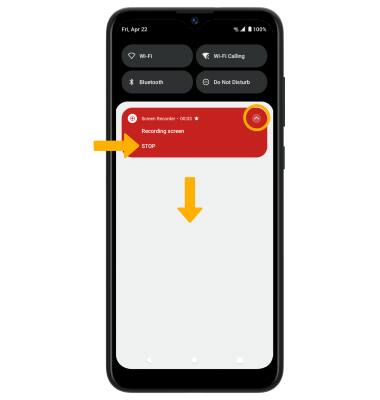
3. To stop the recording, swipe down from the Notification bar then select the Recording screen notification > STOP. The screen recording will be saved automatically.
Note: To access screen recordings, from the home screen, select the
Photos app > Library tab > Movies.