In this tutorial, you will learn how to:
• Access camera settings
• Change the picture size
• Turn the flash on or off
• Set the timer
• Access and use Smart Composition
• Tap anywhere to capture
Access camera settings
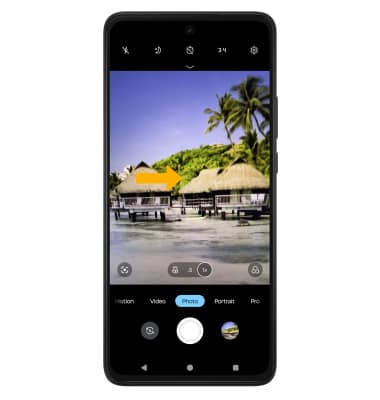
From the home screen, select the  Camera app then select the
  Settings icon.
Change the picture size
From the camera screen, select the  Ratio icon then select the desired option.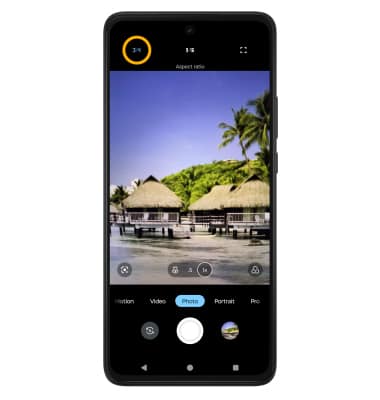
Turn the flash on or off
From the camera screen, select the  Flash icon then select the desired option.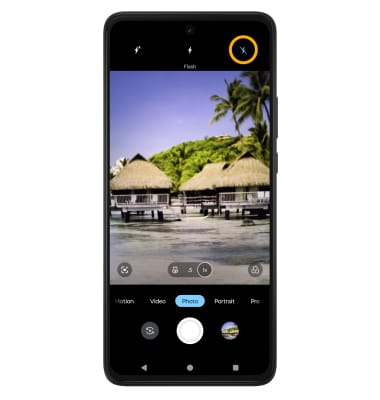
Set the timer
From the camera screen, select the  Timer icon then select the desired option.
Access and use Smart Composition
From the camera settings screen, scroll to and select Capture methods then select the Smart composition switch.
Note: When this feature is enabled, the camera will automatically level and implement the rule of thirds.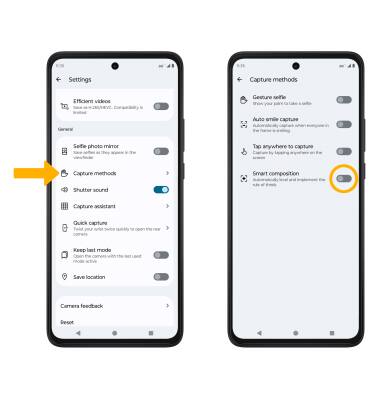
Tap anywhere to capture
1. From Camera settings screen, scroll to and select Capture methods then select the Tap anywhere to capture switch.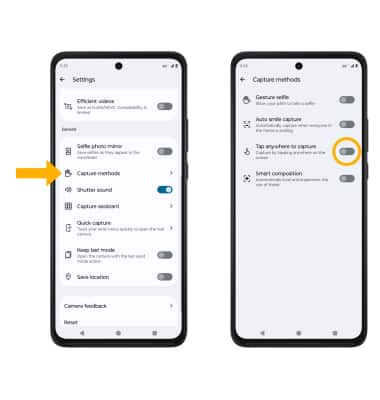
2. From the Camera screen, select anywhere on the screen to take a photo.