
In this tutorial, you will learn how to:
• Take a screenshot
• Share, edit and delete screenshots
Take a screenshot
Press the Power/Hang Up and Volume Down buttons simultaneously.
Note: To access screenshots, from the home screen, press the OK button to access the Apps tray. Press the navigation keys to highlight the Gallery app, then press the OK button to select.
Share, edit and delete screenshots
From the Gallery app, press the navigation keys to highlight the desired screenshot, then press the Right Menu key to select Options. Use the navigation keys to navigate to the desired option:
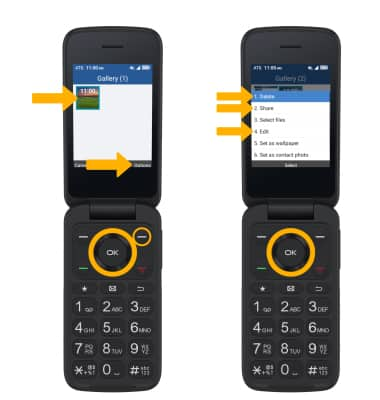
• DELETE: Ensure that Delete is highlighted, then press the OK button to select. Press the Right Menu key to confirm.
• EDIT: Press the down navigation key to highlight Edit, then press the OK button to select. Use the navigation buttons and the OK button to edit screenshots as desired.
• SHARE: Press the down navigation key to highlight Share, then press the OK button to select. Follow the prompts to share the screenshot.
• EDIT: Press the down navigation key to highlight Edit, then press the OK button to select. Use the navigation buttons and the OK button to edit screenshots as desired.
• SHARE: Press the down navigation key to highlight Share, then press the OK button to select. Follow the prompts to share the screenshot.