

• Adjust Wi-Fi inactive time
• Change Device Display Timeout
Use the original charger and battery to maintain optimal battery performance over the life of your device. The battery comes partially charged. Battery life and charge cycles vary by use and settings. This device supports wireless charging.
Adjust Wi-Fi inactive time
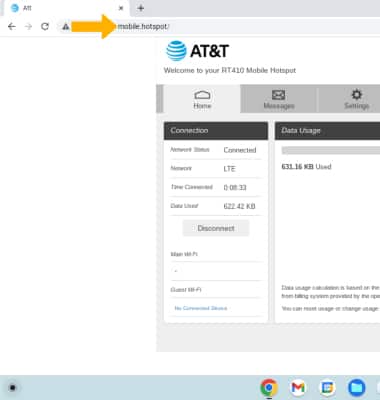
2. Click Settings.
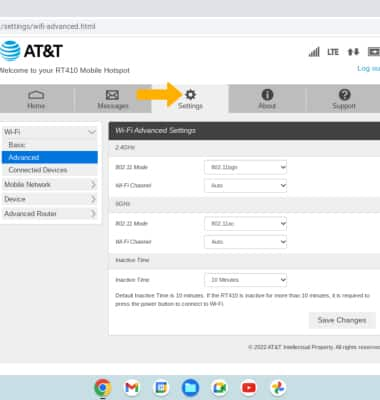
3. Click the Wi-Fi menu, then click Advanced.
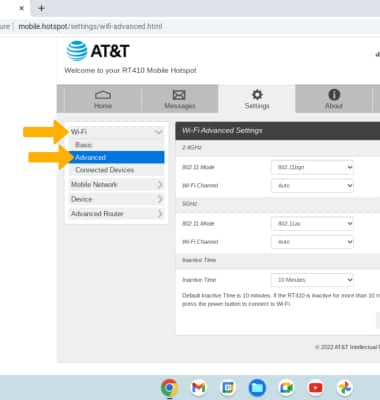
4. Click the desired Wi-Fi Inactive Time from the drop-down menu, then click Save Changes.
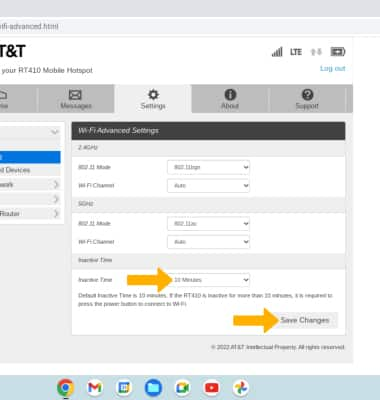
3. Click the Wi-Fi menu, then click Advanced.
4. Click the desired Wi-Fi Inactive Time from the drop-down menu, then click Save Changes.
Change Device Display Timeout
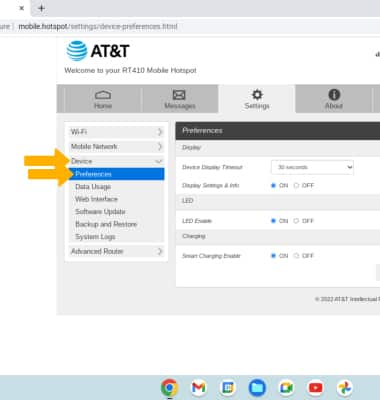
1. From the Settings screen, click Device then click Preferences.
2. Click the desired Device Display Timeout duration from the drop-down menu, then click Save Changes.
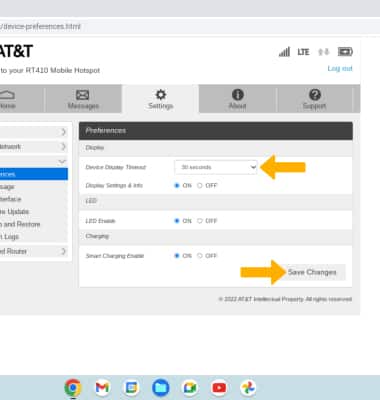
2. Click the desired Device Display Timeout duration from the drop-down menu, then click Save Changes.