
In this tutorial, you will learn how to:
• Take a photo
• Switch between the front and rear cameras
• Focus the camera
• Zoom in and out
• Use Multicapture
• Switch between the front and rear cameras
• Focus the camera
• Zoom in and out
• Use Multicapture
This tutorial requires you to open the Camera app. From the home screen, select the  Camera app. To access the camera from the lock screen, press the Side button twice or select and drag the Camera icon up.
Take a photo
Select the Capture icon.
Note: Alternately, press either of the Volume buttons.

Note: Alternately, press either of the Volume buttons.
Switch between front and rear cameras
Select the Switch camera icon.
Note: You can also swipe up or down to quickly switch between the rear and front facing cameras.
Note: You can also swipe up or down to quickly switch between the rear and front facing cameras.
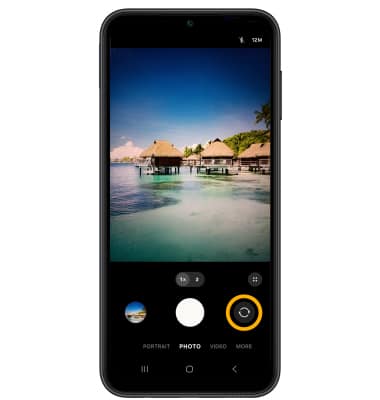
Focus the camera
Select the screen in the desired location to focus the camera.
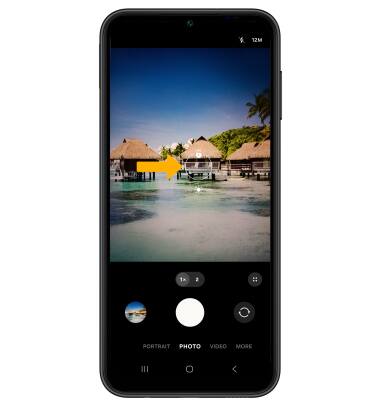
Zoom in and out
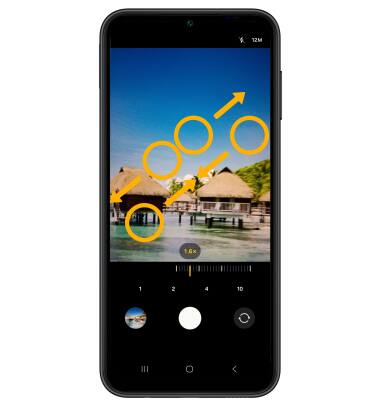
Drag two fingers from the middle of the screen toward the outer edges of the screen to zoom in. Pinch two fingers from the outer edges of the screen to the middle of the screen to zoom out.
Use Multicapture
Select and drag the Capture icon down to the bottom of the screen to take a burst of images. The number of photos taken will appear on the capture icon. Release your finger to stop.
Note: You cannot take burst shots in high resolution. To change the camera resolution, select the Ratio icon then select the desired option.

Note: You cannot take burst shots in high resolution. To change the camera resolution, select the
Ratio icon then select the desired option.