ADDING A NEW DEVICE
Customize your hotspot
Shop and purchase
- 1. Pick your device
- 2. Customize your hotspot
- 3. Choose your plan
- 4. Get add-ons
- 5. Review your cart
Checkout
Checkout
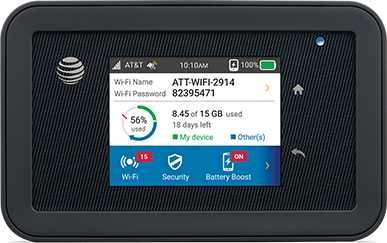
AT&T Unite Explore
This AT&T Unite Explore is no longer available.
Overall rating
4.0
Design
4.2
Features
4.2
Performance
4.1
of 66 AT&T Unite Explore reviewers recommend this product
HIGH RATING
Rated 5 out of 5 stars with 5 reviews
5.05
8/4/2017
Works as expected
Easy to use, a lot faster than the air card I used previously.
Helpful?
LOW RATING
Rated 1 out of 5 stars with 5 reviews
1.05
11/13/2016
Piece of junk. Do not buy it.
Very unstable. Does not connect to network most of the time requiring pulling the battery. Battery will shut down if left plugged in for charging once fully charged. You have be watching the charging to prevent the shut down.
Helpful?
Reviews
Rating snapshot
Select a row below to filter reviews
5 starsstars
41
41 reviews with 5 stars.
4 starsstars
12
12 reviews with 4 stars.
3 starsstars
4
4 reviews with 3 stars.
2 starsstars
2
2 reviews with 2 stars.
1 starstars
10
10 reviews with 1 star.
Overall Rating
4.0
54 out of 66 (82%) reviewers recommend this product
Review this Product
Select to rate the item with 1 star. This action will open submission form.
Select to rate the item with 2 stars. This action will open submission form.
Select to rate the item with 3 stars. This action will open submission form.
Select to rate the item with 4 stars. This action will open submission form.
Select to rate the item with 5 stars. This action will open submission form.
Adding a review will require a valid email for verification
Summary of Reviews
AI-generated from customer ratings & reviews, and may include incentivized reviews.
- The mobile hotspot device offers reliable and fast 4G internet connectivity, with praise for its excellent battery life, rugged design, and ability to connect multiple devices.
- Users find it easy to set up and use, with appreciated features like guest Wi-Fi access and data usage monitoring.
Show more
Helpful?
Thank you for your feedback
Your insights help us improve!
You can type a maximum of 250 characters.
0/250 maximum
Average customer ratings
Design
Design, 4.2 out of 54.2
Features
Features, 4.2 out of 54.2
Performance
Performance, 4.1 out of 54.1
Most helpful favorable review
5 out of 5 stars.
Great portable hotspot
10 years ago
I was a little concerned after reading the prior reviews that indicated this device would only charge when connected directly via USB to a computer or with the supplied Netgear wall charger. I use an Anker multiport USB charger as well as a couple of different battery packs to charge all my small electronic devices on the road. I took one of my battery packs to the AT&T store and they let me try it before hand. Low and behold it charges just fine in both the 1 amp and 2.1 amp mode. One thing to note is that it takes a while for the charging symbol to come on. At first I thought it wasn't going to charge, but after about 15 seconds, the charging symbol came up. I went ahead and bought it, and have since tried to charge the device using a car charger, aftermarket USB charger, and a battery pack and they all worked just fine. Just wait a few seconds and the charging symbol shows up. I can also verify that it does in fact charge as my percentage went to 100% after leaving it plugged in.
Aside from that I really like the features. So far, it's not that much different from my previous Unite hotspot, but the battery lasts so much longer and it supports more devices. I love it. The downside is that it is a bit bigger than the previous generation Unite.
One thing I wish it had was an SD card slot so I could transfer files between devices.
80 people found this helpful
Show Reviews:
Most helpful critical review
1 out of 5 stars.
Charging
10 years ago
This device is not suitable as a mobile hotspot. It can only be charged when directly connected to a computer or using the AC adapter supplied by Netgear. It cannot be charged when connected through a USB hub or from a 12 VDC auto adapter. Netgear did not properly design this device to usable in a mobile environment even though it is called a mobile hotspot.
61 people found this helpful
Show Reviews:
Filter Reviews
- wi-fi
- charging
- purchase
- for computers
- satisfaction
- connections
- product features
- design
Filters
Sort by
Most recent
1 to 4 of 69 reviews .
1 – 4 of 69 reviews
5 out of 5 stars.
No more CRAPCAST!
8 years ago
This thing is AWESOME! We are running our entire house on our hot spot with ZERO issues. We have unlimited data with the understanding if we go over 22G then it may slow down. Well.... last night we were at 70G and three people were still streaming with no issues. I'll never go back to a "normal" internet connection again.
Yes, I recommend this product.
Helpful?
Design
Design, 4.0 out of 54.0
Features
Features, 4.0 out of 54.0
Performance
Performance, 5.0 out of 55.0
5 out of 5 stars.
Great product
8 years ago
I bought this product to run my little brothers Xbox one and it run it perfectly, before it would lag like crazy but with this hotspot it doesn't lag at all
Helpful?
Design
Design, 5.0 out of 55.0
Features
Features, 5.0 out of 55.0
Performance
Performance, 5.0 out of 55.0
4 out of 5 stars.
WiFi solution
8 years ago
Thanks for coming up with a solution for our data/WiFi usage! So far so good, a few more days until everything resets and we see what the bill estimate will be for the 1st partial month but the data download has been better.
Yes, I recommend this product.
Helpful?
Design
Design, 5.0 out of 55.0
Features
Features, 5.0 out of 55.0
Performance
Performance, 4.0 out of 54.0
5 out of 5 stars.
Hot Spot
8 years ago
So far the device has met our expectations.
Yes, I recommend this product.
Helpful?
Design
Design, 5.0 out of 55.0
Features
Features, 4.0 out of 54.0
Performance
Performance, 4.0 out of 54.0
1 – 4 of 69 reviews
Questions
Start typing your question and we'll check if it was already asked and answered.
1 - 10 of 265 questions
Sort by
Featured questions first
Q: How many devices can connect to the AT&T Unite Explore Hotspot?
8 years ago0 Answers
Q: Is there a data plan that allows me to use this device in Tokyo, Japan?
8 years ago1 Answer
- A: Hey Weyout! Wonderful question! Being able to take your mobile hotspot to Tokyo, Japan would be completely awesome! This is definitely possible with any AT&T International plan. You can take a look into this here: https://www.att.com/offers/international-plans/europe-caribbean-country-more.html I hope this helps! Have a fantastic day. Jess, AT&T Community Specialist8 years agoHelpful?
Q: Is there a wifi extender that works with the Unite?
8 years ago1 Answer
- A: Hi there Cameron47! Wi-Fi extenders can be a great way to ensure all of your devices have the coverage needed. In most cases, the hotspots are not designed for external antennas. However I do recommend reaching out to the manufacturer for compatible options. They can be reached at: https://www.netgear.com/. Thanks for asking! Fiona, AT&T Community Specialist8 years agoHelpful?
Q: My S7 Edge only gets 2 bars on average. I travel the country and often I get no signal. The guy I travel with has Verizon and a cheap phone and he gets 3 to 4 even when I get nothing. Will this pull in a signal better than my S7 phone?
8 years ago1 Answer
- A: Hello Frustrated Traveler, There are many implications when it comes to service issues as it could be the network, or the device. Since the service issue is not isolated to one specific area, we would want to perform some troubleshooting with you to determine what the root cause is. There is an awesome Troubleshoot & Resolve tool which checks for network, device, or provisioning errors. Make sure you log in first! You can find this tool here: https://ufix.att.com/portal/index.html?tGseq=validate__nav_home__ref_https%3A%2F%2Fwww.google.com%2F&AUTHN_ACTION=PASSWD_LOGIN#home. Hope this information helps. Aaron, AT&T Community Specialist8 years agoHelpful?
Q: What is the amp of the charger"?
8 years ago1 Answer
- A: Hello JeffreyKernan, Great question! You have a few different options when charging your hotspot. To see the specific amperage you can look on your factory charger. I apologize we do not have this information listed but you can reach out to Netgear to receive a specific amp for each of your 3 cables. There web page is https://www.netgear.com/ I hope this helps! James, AT&T Community Specialist8 years agoHelpful?
Q: I have a cabin up north, my 4G phone has great reception. We are planning on putting a Nest Thermostat in the cottage to monitor the temp during the winter months from our home. Can we use the hot spot as the connection to the Nest?
8 years ago1 Answer
- A: Great question MEK64, Yes, you can use your mobile hotspot to connect a thermostat to your phone. You will need to leave the device plugged in and in the house to continuously hold the connection. By doing this, you will be using your data the entire time it is connected. I’m happy to help. James, AT&T Community Specialist8 years agoHelpful?
Q: Would this be part of my unlimited data plan?
8 years ago1 Answer
- A: Hello TinmansRose, If you are currently on our Unlimited or Unlimited Plus Plan, this dedicated hotspot device is eligible to be placed under the these plans! Hope this helps! James, AT&T Community Specialist8 years agoHelpful?
Q: I have an RV and want to use the UNITE as a hotspot to connect to my laptop. With the laptop I will connect thru HDMI to my bigscreen TV and hopefully be able to eliminate my satellite dish service. Am I missing anything?
8 years ago1 Answer
- A: Greetings bigdon68, As long as you have a data plan, this device does provide a wireless connection to other devices, such as a laptop, so there will be no issues on this end. Best of luck and have a great day! Jonathan, AT&T Community Specialist8 years agoHelpful?
Q: I'm trying to order a unite explorer online and get in store pickup. It says the store closest to me is out of stock but I called and they do have it. How do I select this option.
8 years ago1 Answer
- A: Greetings Hooter11! We appreciate you reaching out to us! I would be more than happy to answer your AT&T Explore question. Ordering products online is definitely a convenience; you should be able to order that device and have it shipped to that specific store. If you would like to receive this device quicker, I recommend visiting that location and purchasing it there. Have yourself a swell Friday, but even better weekend! Aaron, AT&T Community Specialist8 years agoHelpful?
Q: Does this hotspot use your data that is on your phone plan? How are data terms different
8 years ago0 Answers
1 - 10 of 265 questions