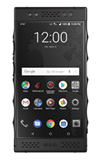
- BACKUP/RESTORE CONTACTS: From the home screen, swipe up to the Apps tray. Select the Contacts app.
Note: Inserting a memory card (microSD card) into your device allows you to transfer and store contacts, music, pictures, and videos. MicroSD cards are sold separately.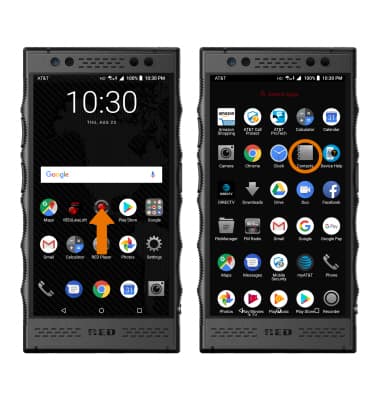
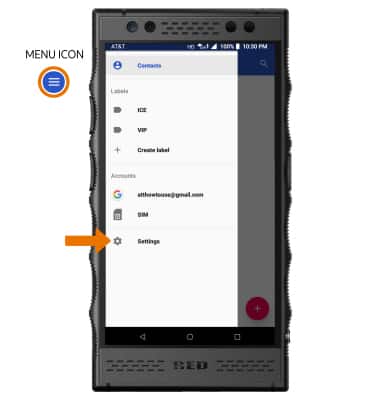
- Select the Menu icon, then select Settings.
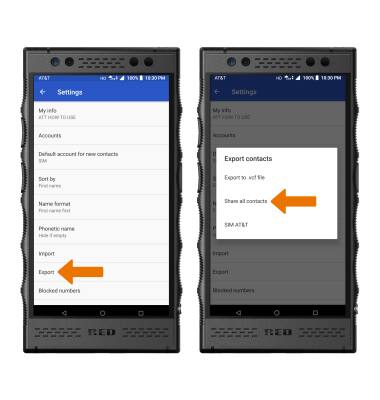
- Select Export, then select Share all contacts. Your contacts will be backed up to the MicroSD card.
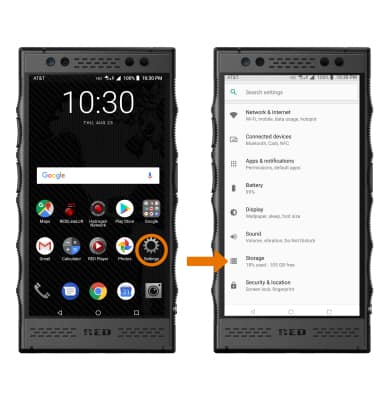
- BACKUP/SAVE MUSIC & PHOTOS TO THE SD CARD: From the home screen, select the Setting app then select Storage.
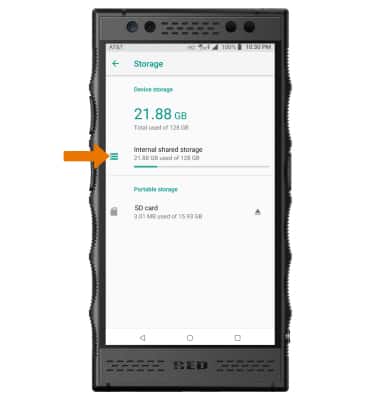
- Select Internal shared storage.
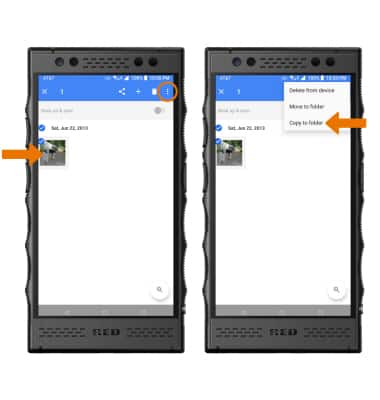
- Navigate to and select the desired file(s). Select the Menu icon, then select Copy to folder.
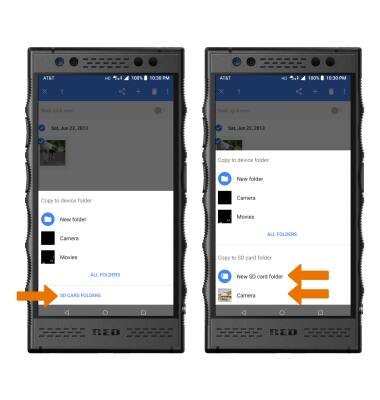
- Select SD CARD FOLDERS, then select the desired option.
Back up & Restore with a Memory Card
RED Hydrogen One (H1A1000)
Back up & Restore with a Memory Card
Backup contacts, photos, and files to increase device memory or transfer to another device.
INSTRUCTIONS & INFO