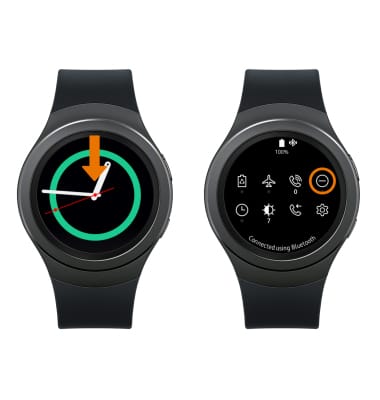
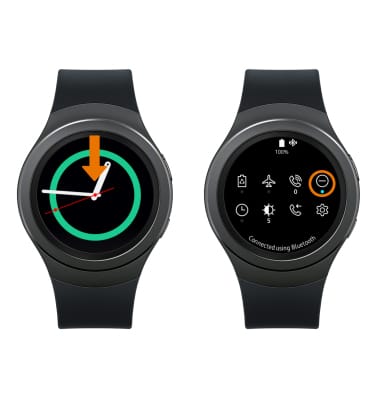
- TURN ON DO NOT DISTURB: From the clock screen, swipe down from the top of the screen. Select the Do not disturb mode icon.
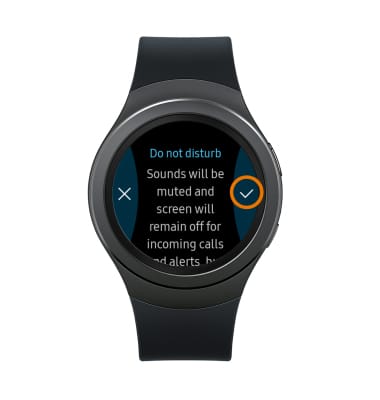
- Review the Do not disturb prompt, then select the Checkmark icon.
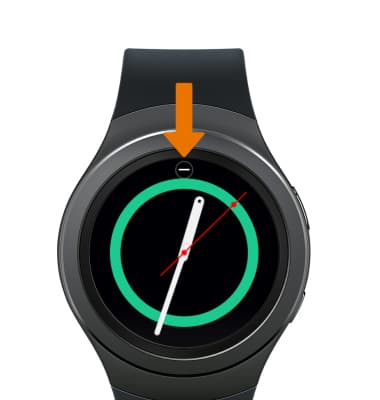
- When the Do not disturb mode is on, the Do not disturb icon will be displayed at the top of the screen.
- TURN OFF DO NOT DISTURB MODE: From the clock screen, swipe down from the top of the screen. Select the Do not disturb mode icon.
Do Not Disturb
Samsung Gear S2 (R730A)
Do Not Disturb
Do not disturb mode mutes sound and the screen will remain off for incoming calls and alerts, but not alarms.
INSTRUCTIONS & INFO