
- CLEAR APP CACHE: From Settings, select Apps & notifications > select desired app > Storage > select CLEAR CACHE.
Note: To access Settings, swipe down from the Notification bar then select the Settings icon.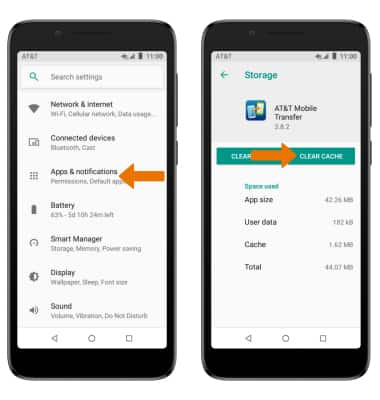
- STOP AN APP: From the App info screen, select the desired app then select FORCE STOP.
Note: Select OK to confirm.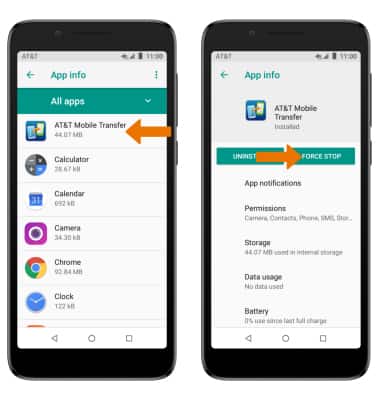
- CHECK FOR APP UPDATE: From the home screen, select the Play Store app > Menu icon > My apps & games > desired app > UPDATE.

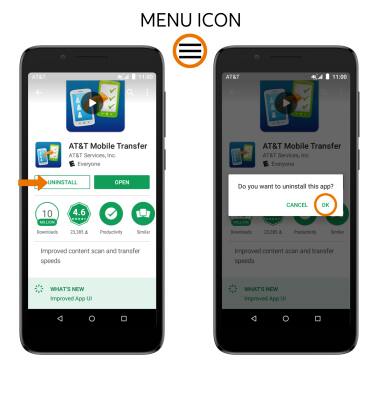
- REMOVE AN APP: From the desired app in the Play Store, select UNINSTALL then select OK.
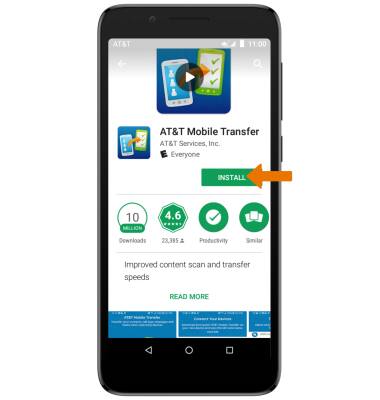
- REINSTALL A PREVIOUSLY UNINSTALLED APP: From the desired app in the Play Store, select INSTALL then follow the onscreen prompts.
App Troubleshooting
Alcatel idealXtra (5059R)
App Troubleshooting
Clear an application's cache, stop an application, check for an application update, and remove and reinstall an application.
INSTRUCTIONS & INFO