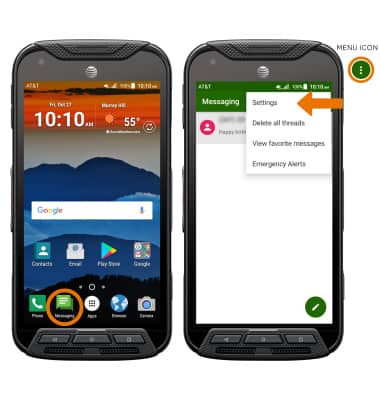
- ACCESS MESSAGING SETTINGS: From the home screen, select the Messaging app. Select the Menu icon, then select Settings.
- Scroll to and select the Notifications switch ON, then select Sound to change the Messages ringtone. Select the desired notification tone, then select OK.
Note: The Notifications switch is ON by default.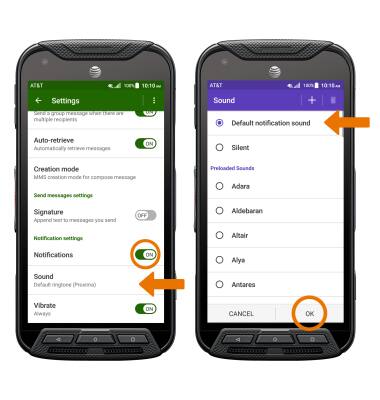
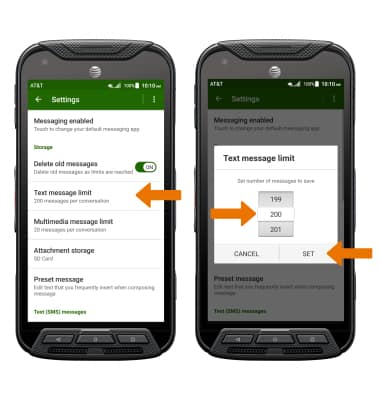
- ADJUST TEXT LIMIT: Select Text message limit, then enter the desired Message limit and select SET.
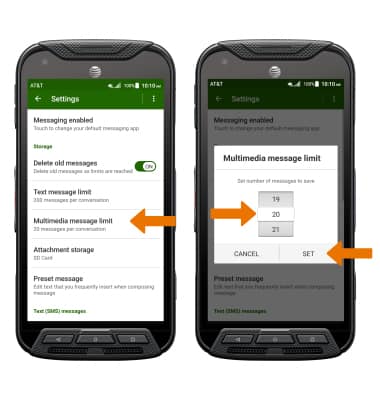
- ADJUST MULTIMEDIA LIMIT: Select Multimedia message limit, then enter the desired Message limit and select SET.
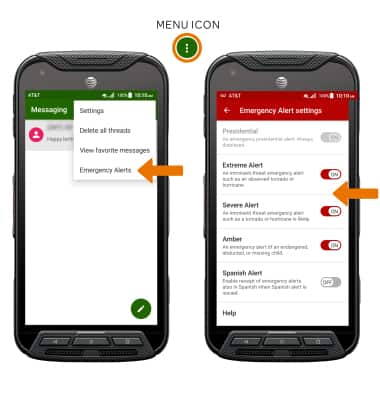
- EMERGENCY ALERTS: From the Messaging app, select the Menu icon > Emergency Alerts > Menu icon > Settings > adjust Emergency Alert Settings as desired.
Note: Learn more about Wireless Emergency Alerts (WEA).