- To access your Gear's dedicated voicemail box, press the Power/Home button.
Note: To call your Gear's dedicated voicemail box, tap and hold the 1 key from your Gear's phone dialer. To check your phone's voicemail using Gear, it must be connected to your phone via Bluetooth.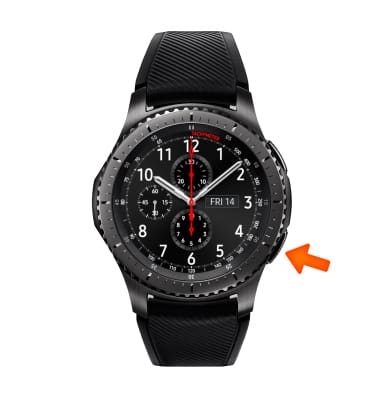
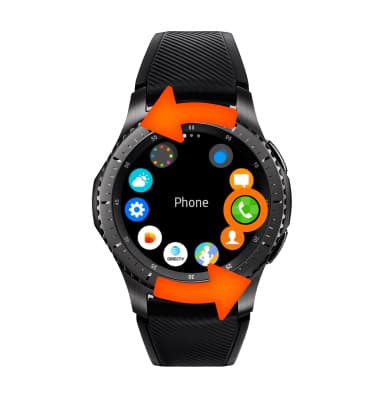
- Rotate the bezel, then select the Phone icon.
- Select the Keypad icon.
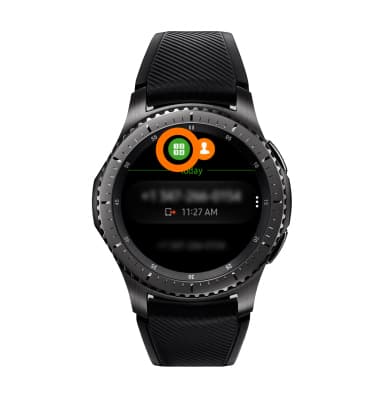
- Select and hold the 1 key.
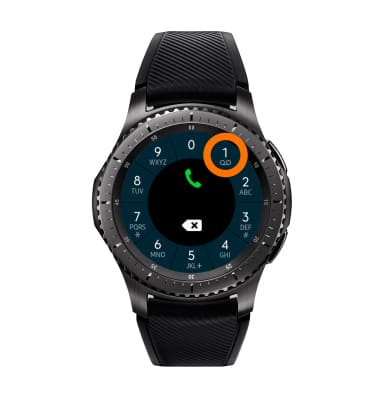
- Enter your current voicemail password, then follow prompts to check voicemail etc.
Note: If you have forgotten your password, reset your voicemail password. View Access AT&T Basic Voicemail for tips to manage your voicemail. Go to Troubleshoot Voicemail for solutions to common voicemail problems.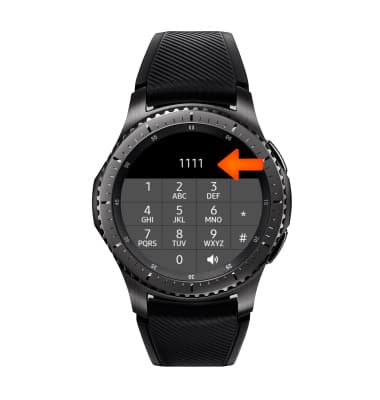
Access Voicemail
Samsung Gear S3 frontier (R765A)
Access Voicemail
Check your voicemail messages.
INSTRUCTIONS & INFO