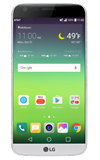
- ADD A NUMBER TO THE BLOCK LIST: From the home screen, select the Phone app. Select the Call logs tab.
Note: To automatically block calls from likely fraudsters, get alerts on suspected spam, and manually block calls learn more about AT&T Call Protect. Free for eligible users.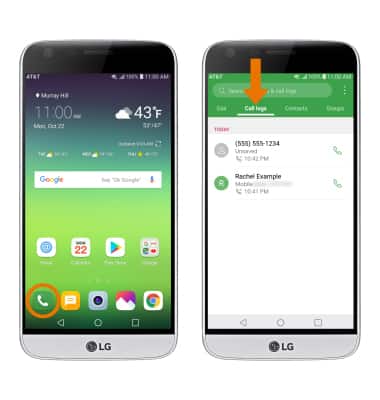
- Select and hold the desired number to block, then select Block number. Select BLOCK to confirm.
Note: To manually block a phone number, from the Phone app select the Menu icon > Call settings > Call blocking & Decline with message > Blocked numbers > Add icon > desired number location > desired contact > DONE.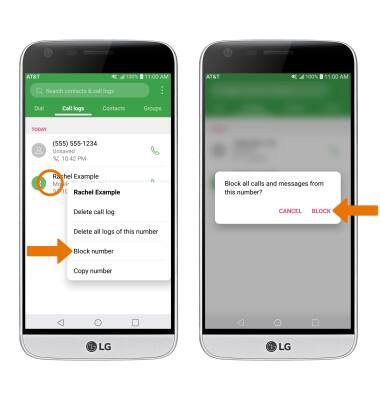
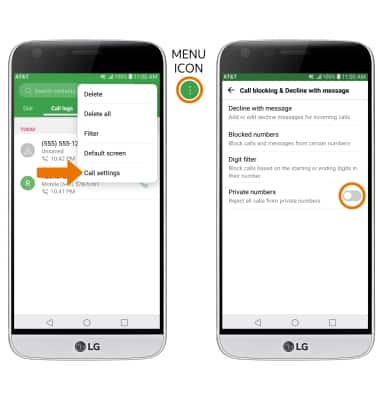
- BLOCK UNKNOWN NUMBERS: To add all unknown numbers (no caller ID) to the rejection list, from the Phone app select the Menu icon > Call settings > Call blocking & Decline with message > select the Private numbers switch to place it in the on position.
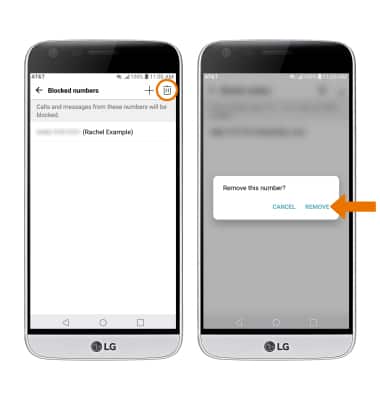
- REMOVE A NUMBER FROM BLOCK LIST: From the Blocked numbers list, select the Delete icon > the desired number(s) > REMOVE > REMOVE again to confirm.
Block or Unblock Calls
LG G5 (H820)
Block or Unblock Calls
Block or unblock calls from your device.
INSTRUCTIONS & INFO

When a call is blocked, it is routed directly to voicemail. The call blocking feature may not affect phone calls made or received via third-party apps installed on your device. Please contact third party app developers for assistance with such applications.