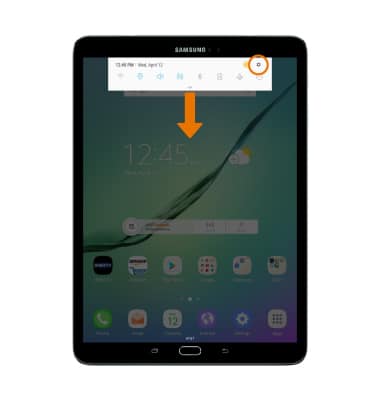
- ACCESSIBILITY FEATURES: Swipe down from the Notification bar, then select the Settings icon.
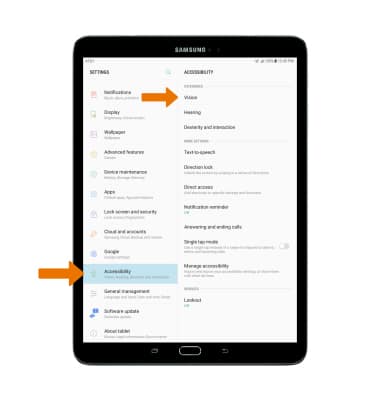
- ACTIVATE VOICE ASSISTANT: Select Accessibility, then select Vision.
- Select Voice Assistant.
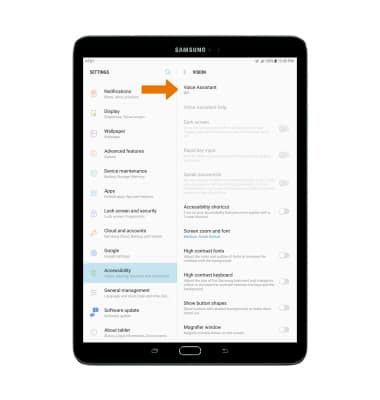
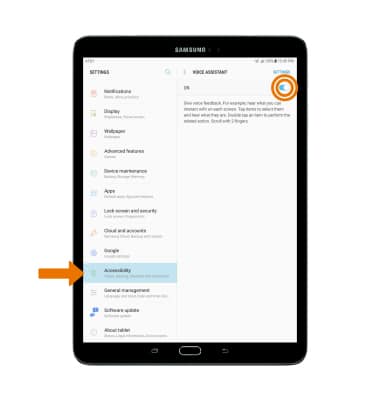
- Select the Voice Assistant switch to turn it on.
Note: Upon turning on Voice Assistant you will be prompted with permissions and a tutorial, select OK to proceed through the prompts and press the Home button to continue.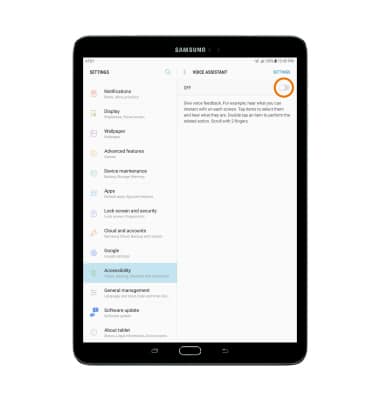
- Once Voice Assistant is turned on, you must double-tap an item for it to work. To turn off Voice Assistant, from the home screen double-tap Settings > Accessibility > Vision > Voice assistant > double-tap the switch OFF.
Accessibility
Samsung Galaxy Tab S2 9.7 (T817A/T818A)
Accessibility
Accessibility features allow you to improve the usability of your device for users affected by impaired vision or hearing, cognitive difficulty, or reduced dexterity.
INSTRUCTIONS & INFO